Core Interface Elements That Improve Accessibility in E-Scooter Apps
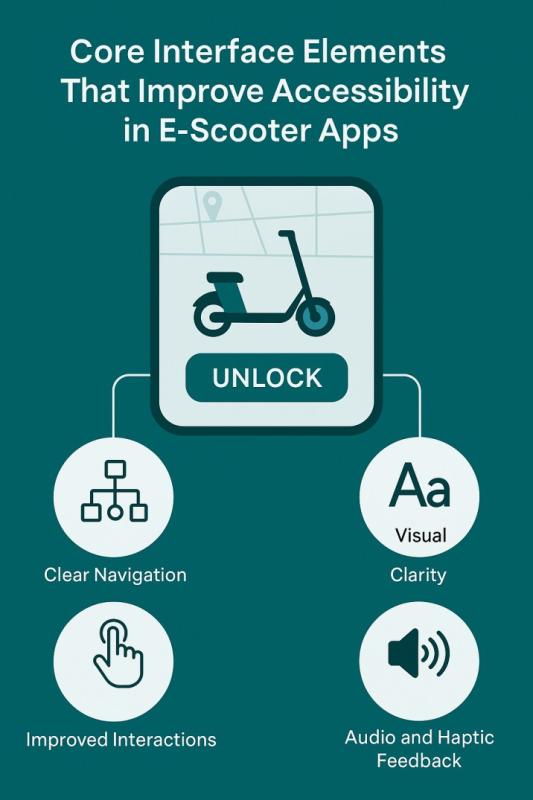
Accessible interface design has become a crucial requirement as shared mobility services continue expanding across cities. For developers working on e scooter app development, prioritizing inclusive design ensures that users with different physical, sensory, and cognitive needs can comfortably and safely operate these services. Accessibility is not limited to meeting standards; it is about creating a usable, reliable, and intuitive experience for everyone. Well-structured interface components, thoughtful navigation models, and adaptive feedback mechanisms form the foundation of such inclusive applications.
Understanding User Diversity to Improve E Scooter App Usability
E-scooter apps serve broad communities, including riders with varying abilities, levels of experience, and technology proficiency. Considering user diversity early in the design process helps teams build interfaces that reduce confusion and cognitive stress. Developers must understand how individuals with motor challenges, limited mobility, visual impairments, or hearing difficulties interact with mobile applications. This inclusive awareness ensures that e scooter app development incorporates not only practical functionality but also human-centered design principles.
Key considerations include:
Differences in device handling, such as grip strength or hand tremors
Visibility needs involving text size, contrast, and accessible color palettes
Dependence on audio or haptic feedback for navigation
Cognitive load requirements, such as simplified flows and predictable actions
Varying environmental conditions, including glare, noise, and poor lighting
Analyzing these aspects enables teams to deliver more reliable mobile app development solutions that reduce barriers and improve safety across all environments.
Core Navigation Patterns That Support Accessibility in Apps
Navigation patterns play an essential role in ensuring smooth interaction within e-scooter applications. Riders often use the app outdoors, sometimes while standing near busy roads or in motion, which increases the need for straightforward interface structures.
Important navigation considerations include:
Clear and consistent menus
Icons and labels must remain stable across screens, helping users form reliable mental models of the system.Minimizing steps to complete tasks
Essential actions such as scanning a scooter, starting a ride, or ending a session should be achievable in two or three taps.Logical grouping of key features
Ride details, safety information, parking instructions, and payment options should be placed near each other so users can find them without searching.Large interactive zones
Buttons and selections need ample spacing and size to facilitate easy interaction for people with motor limitations or small screens.
Effective navigation patterns significantly influence the overall accessibility of e-scooter applications by helping users quickly understand pathways and avoid errors.
Enhancing Visual Clarity Through Thoughtful Interface Components
Visual clarity is fundamental to making app content legible in various conditions. Outdoor use exposes screens to glare, low lighting, and motion, which means interface components must remain readable even in challenging environments. This becomes particularly important for individuals with low vision or color-perception difficulties.
Strategies to improve visual clarity include:
High-contrast color schemes to distinguish text, icons, and interactive elements
Readable font sizes that do not compromise layout balance
Non-reliance on color alone to convey meaning, ensuring icons or labels supplement critical information
Minimalist design choices that reduce visual clutter and highlight essential actions
Consistent iconography to help users quickly identify familiar features regardless of screen context
Visual accessibility ensures that users can operate the app confidently, even when conditions fluctuate or when operating a scooter in busy settings.
Improving Interaction Elements for Users with Motor Limitations
Users with limited motor control often face challenges when interacting with small touch targets, multi-step gestures, or fast-moving interface elements. Designing interaction components with these users in mind creates a more accommodating environment for all riders.
Essential improvements include:
Enlarged touch targets
Buttons and inputs should meet minimum accessibility size requirements to ensure easy tapping, even for users with limited precision.Reduced reliance on complex gestures
Actions requiring dragging, pinching, or swiping quickly can introduce errors; simple tap-based interactions are more inclusive.Adjustable sensitivity settings
Allowing users to modify movement-based controls provides a personalized experience based on individual motor capabilities.Clear feedback indicators
Immediate confirmations reduce uncertainty, helping users feel in control of each action taken.
These considerations not only improve inclusivity but also reduce operational errors, benefiting all users, especially when interacting under pressure or in motion.
Optimizing Audio and Haptic Cues to Assist Inclusive Navigation
Audio and haptic cues can significantly enhance accessibility by providing redundant forms of feedback that support users with visual or cognitive limitations. Since e-scooter riders often rely on quick interactions, these cues help clarify whether an action has been completed successfully.
Common applications of audio and haptic integration include:
Ride start and end confirmations
Alerts for parking violations or unsafe zones
Feedback for successful QR code scans
Notifications related to battery level or route warnings
However, audio alone cannot be relied upon, especially in noisy outdoor environments. Haptic signals offer subtle but effective alternatives that ensure users receive essential information regardless of surroundings. Balanced use of both modalities creates a dependable system that supports diverse accessibility needs.
Ensuring Data Presentation Supports Cognitive Accessibility Needs
Cognitive accessibility focuses on supporting users who have difficulty processing complex information or multitasking. When riding or preparing to ride an e-scooter, users often handle various forms of data, including pricing, speed rules, parking instructions, and safety guidance. Presenting this information in a digestible format is critical.
Effective cognitive accessibility strategies include:
Simplified sentences and minimal jargon
Straightforward sequencing of steps for unlocking or ending a ride
Use of icons paired with text to reinforce understanding
Predictable interface layouts where features appear in consistent locations
Progressive disclosure methods that show advanced details only when needed
Such design choices help reduce cognitive overload, enabling users to focus on the riding experience rather than deciphering the interface. This clarity also influences e scooter app development cost, as early attention to cognitive needs helps prevent expensive redesigns later in the process.
Testing Interface Designs to Guarantee More Accessible Experiences
Accessibility cannot be guaranteed through guidelines alone; real-world testing is essential. Evaluating interface designs with diverse groups of users helps identify gaps that might not be apparent during development.
Key testing practices include:
Involving individuals with disabilities in usability testing to gather meaningful feedback
Conducting environmental tests under varied lighting, weather, and noise conditions
Performing device diversity checks to ensure compatibility across different screen sizes and operating systems
Reviewing results through accessibility audits using manual and automated methods
Iterating based on measurable feedback rather than assumptions
Comprehensive testing ensures that accessibility functions not as a theoretical standard but as a practical, consistently validated requirement throughout the design and development lifecycle.
Building a Sustainable Approach for Long Term Accessibility Success
Creating an accessible e-scooter application is not a one-time effort. It requires continuous commitment from designers, developers, and product teams. As operating systems evolve, cities introduce new regulations, and user expectations change, accessibility needs must be reassessed regularly.
A sustainable accessibility strategy includes:
Regular reviews of interface components to adjust to new standards
Ongoing team training on inclusive design practices
Documentation of accessibility decisions to maintain clarity during version updates
Feedback channels that enable users to report accessibility obstacles quickly
Continuous performance optimization to keep the app responsive and reliable
Sustainability ensures that accessibility remains an integral part of development rather than an added layer. It also strengthens the long-term value and usability of e scooter app development projects.
Conclusion
Accessible interface design is essential for ensuring safe and comfortable e-scooter use for riders of all abilities. By focusing on visual, motor, cognitive, and sensory accessibility needs, design teams can create interfaces that support consistent, reliable, and enjoyable mobility experiences. Thoughtful navigation, practical feedback mechanisms, inclusive visual structures, and rigorous testing collectively help deliver applications that meet real-world demands. Prioritizing accessibility from the outset promotes user trust and contributes to a more equitable urban mobility ecosystem.
Post Your Ad Here
Comments