Compare Pricing for CAD to BIM Conversion Services
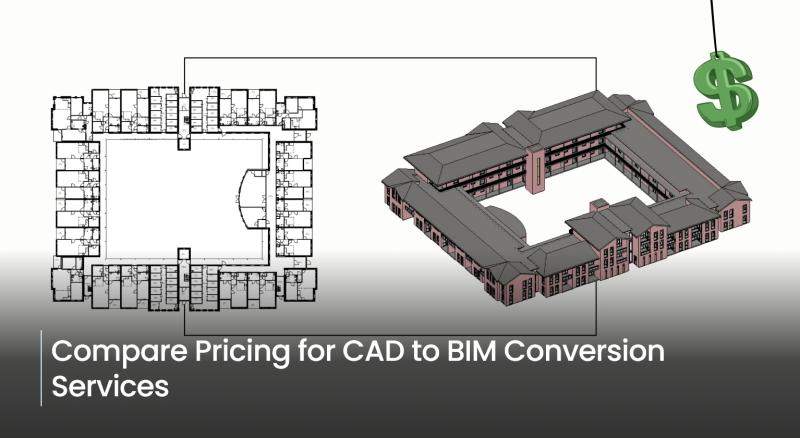
In the Architecture, Engineering, and Construction industry, the shift from traditional Computer-Aided Design to Building Information Modeling (BIM) is no longer an option—it's a necessity for modern project delivery. For firms with decades of project history locked in static 2D CAD files, CAD-to-BIM conversion services serve as the vital bridge, transforming legacy data into dynamic, intelligent 3D models. CAD to BIM conversion is the process of converting existing design data—most commonly 2D CAD drawings (such as DWG, DXF, or scanned blueprints) and PDFs—into information-rich, parametric 3D BIM models, typically using software such as Autodesk Revit or Archicad.
Unlike traditional 2D CAD drawings, which are simply lines representing geometry, a BIM model is a database. Every element (a wall, a door, a pipe) is an intelligent object that contains non-graphic information like material, cost, manufacturer details, and fire rating. This integration of geometry and data is what makes the BIM model a "single source of truth" for the project's entire lifecycle.
As a crucial and powerful tool in the AEC realm, outsourcing to reliable, renowned service providers can benefit in various ways. AEC firms constantly seek novel ways to adopt the CAD-to-BIM approach and harness the power of BIM technology. Nonetheless, it requires accurate processes, technology expertise, and skills to ensure a smooth CAD-to-BIM conversion. Outsourcing CAD to BIM is beneficial, and one significant benefit is cost.
However, the CAD-to-BIM architectural cost can vary based on multiple factors that affect the overall project cost. Typically, outsourcing delivers better outcomes for AEC firms; however, the market for partnering with third-party service providers has grown rapidly. Hiring any CAD service provider may not align with objectives and project goals, but the cost of prominent conversion also matters. Therefore, it is essential to understand CAD-to-BIM outsourcing pricing and the factors that impact the final cost.
Major Factors Driving Conversion Costs
As discussed, the market of outsourcing for CAD to BIM has rapidly grown. A plethora of service providers offer an extensive range and ensure high quality. However, that is not the case; costing and budgeting matter for the transition as well. The price of outsourcing is influenced by various factors, which is why it is critical to choose the right service provider that aligns with your goals. The final price for your CAD-to-BIM conversion will reflect your project's requirements. Explore the factors that influence the CAD-to-BIM conversion process.
1. Level of Development (LOD): The Level of Development (LOD) is arguably the most critical cost driver. LOD defines the geometric detail and information embedded in the BIM model. The higher the LOD, the more time, skill, and cost are required.
LOD 100 (Conceptual): Low cost. Basic 3D representations without specific data.
LOD 200 (Schematic Design): Moderate cost. Generic elements with approximate quantities.
LOD 300 (Detailed Design/Construction Documents): Mid-to-High cost. Precise geometry and non-graphic information attached (e.g., specific materials, sizes). This is a common requirement for construction.
LOD 400 (Fabrication/Assembly): High cost. Detailed model suitable for fabrication and installation, including shop-drawing-level detail.
LOD 500 (As-Built/Operation): Highest cost. The model accurately represents field conditions, providing rich data for facility management and maintenance.
2. Project Size and Complexity: The CAD to BIM conversion cost is fundamentally a labor-intensive process, so the size of the project (measured in square footage or meters) is a core element of the price. However, complexity can easily outweigh size.
Simple Projects: Open-plan offices, warehouses, or residential units are less complex and therefore less expensive per unit area.
Complex Projects: Hospitals, historic buildings, industrial plants, or high-rise mixed-use developments with intricate geometry, curved walls, or detailed facades will incur higher costs.
3. Number of Disciplines to Model: A single-discipline model is significantly cheaper than a multi-discipline one. The cost increases as you add more building systems to the model.
Architectural Only: Lowest cost. Includes walls, doors, windows, floors, and roof.
Architectural & Structural: Moderate cost. Adds foundations, columns, beams, and bracing.
Full MEP (Mechanical, Electrical, Plumbing): MEP CAD to BIM conversion rates are the highest cost. Requires detailed modeling of ductwork, piping, conduit, fixtures, and equipment, which is highly complex to extract from 2D drawings.
4. Turnaround Time (Schedule): If your project requires a rapid turnaround or an expedited schedule, the service provider will need to allocate more resources (more modelers, overtime), leading to a premium charge on the final quote. Plan ahead to secure the most favorable pricing.
These are some of the key factors, as the cost comparison between CAD and BIM modeling services is not one-size-fits-all. Various factors, including geographic location, also affect the cost of outsourcing CAD to BIM. It is essential to pick a partner that aligns with project goals, can manage complex projects, and has an experienced team with experience similar to your project's.
As a matter of fact, this transition has become crucial for enhancing efficiency and precision in the complex project. Since CAD has its own limitations, building information modeling enables the management of complex projects and ensures accuracy. To partner with the best CAD to BIM service provider, explore how to get the best CAD to BIM conversion cost.
How to Get the Best Price for Your Conversion
Every AEC firm has a limited budget that is evident to follow. Outsourcing firms offer different pricing models and plans, which help firms align with the project's goals. To effectively compare quotes and control your budget, follow these steps:
Define the Scope with LOD: Clearly specify the Level of Development (LOD) required for the model's intended use (e.g., LOD 300 for Construction Documents). Do not ask for a higher LOD than you actually need, as this is an unnecessary expense.
Clean Your Inputs: Before sending files for a quote, ensure your CAD drawings are as clean, organized, and consistent as possible. Consolidate all relevant information and documentation.
Get Multiple Quotes: Pricing varies significantly between providers, especially between local firms and offshore outsourcing partners. Outsourcing to countries with lower labor costs often provides a substantial cost saving, though you must ensure quality control is in place.
Confirm Deliverables: Ensure the quote clearly specifies the output format (e.g., Revit .RVT, IFC, DWG), the required BIM standards (e.g., naming conventions, object libraries), and the extent of data enrichment.
By focusing on these core factors and clearly defining project needs, AEC firms can navigate the complex pricing landscape for CAD to BIM conversion services and make a financially sound decision for the next project.
Concluding Remarks
Converting CAD to BIM has become a prominent trend in the AEC landscape. Simplifying the process and ensuring precision, reliability, and efficiency in the project, outsourcing to the right BIM service provider is evident.



Post Your Ad Here
Comments