Google home not responding –How I make fix quickly
With Google Home, you ease the task of doing multiple things
like changing a song on YouTube or show on Netflix. The area accessibility of
Google Home doesn't end here there is a huge list of its features. Besides
this, you can do the task over a single command. Though Google Home is the most
convenient device that helps a lot sometimes you might face a minute issue due
to any reason. You don't have to worry about those hassles as all issues can be
fixed easily. Moreover, Google Home not responding to your voice, you should go
through this article to get rid of it.
Verify steps to make
Google home error working
First of all, you need to make sure that you have turned on
the Google Home speaker or display and connected it to the wall outlet. Also,
check if the microphone is not muted.
- Verify For Google Home - Touch the microphone mute button at the back of your device to know whether or not the microphone is muted.
- Verify For Google Home Mini (1st gen) and Google Nest Mini (2nd gen) - Toggle the microphone switch on the side of the device to know whether or not the microphone is muted.
- Verify For Google Nest Audio - Toggle the microphone switch which is next to the power cord on the back of the device to know whether or not the microphone is muted.
- Verify For Google Nest Display - Turn on the microphone from the back of the display and you will get to know whether or not the microphone is muted.
In this way, you see the LED of your speak or display
blinking whenever you say “Ok Google” or "Hey Google." In case your
Google Home answers another question, you should try to ask a question that you
haven't asked before in a different way.
Once you check with the above general instructions and the
Assistant still doesn't work properly, you should try to troubleshoot the issue
by performing the given steps to fix Google Home not responding error.
Recommended checks to
fix Google Home not responding issue
Searching for a topic is a current scenario for a user while
accessing the internet and most favorite one is Google but issue arises when Google home not responding and many
reasons behind it like a version of your browser, internet connection ip and many
more so follow here
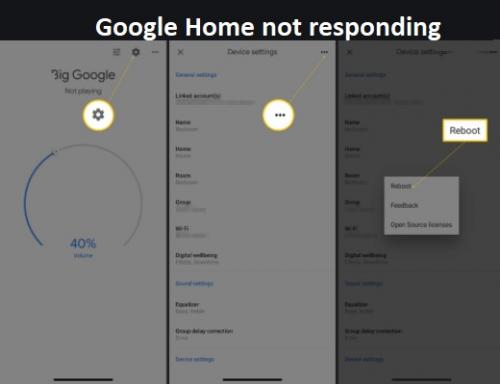
Step 1 - Reboot Your
Speaker or Display
- To do so, you should disconnect the main power cord from your device.
- Wait for a while!
- Then you have to reconnect it to the device.
- Check if your ‘Google Home’ starts working, in case the issue persists, follow the next step.
Step 2 - Check If
Your Device Recognizes the Hotword
Try to check the Hotword and say 'Hey Google' to your
Assistant. If the device recognizes the Hotword, the LED dots on the device
will start blinking or spinning.
Step 3 - Check If
Your Device Recognizes the Question Correctly
• Firstly, you need to ask a question to your
Assistant.
• Next, say 'Hey Google' and repeat the same the question, ensure that the Assistant understands the question correctly.
• On the off chance, the Assistant doesn't
recognize the question, you should try to speak slower or ask another question.
This is how you can fix Google Home not responding error. If
not, follow the given steps.
Step 4 - Set the
Hotword Sensitivity of the Device
When you find that the speaker or display is facing some
trouble whenever you say Ok Google or Hey Google, you can modulate or adjust
the sensitivity to Google Assistant to Hey Google.
Once you perform the above instructions, you will be able to
fix the Google Home issues without much of a stretch.
Fix the Google Home
Problems Instantly From Anywhere
With the above information, you will no longer worry about
resolving Google Home not working issue. In case things go south you shouldn't
worry about it. You can contact the customer service team to get information to
fix Google Home stop responding. All you need is to dial the phone number to
get in touch with Google Support. Apart from this, you can get help from the
support team anytime from anywhere.
Source Url... https://gracypark743.medium.com/is-your-google-home-not-responding-get-a-complete-guide-to-fix-it-e17c6a937b76
Post Your Ad Here
Comments