Did you get a movie from iTunes but you want to watch it on
Android or media server solutions as well? Then you need to opt for a fairplay DRM removal solution because you can’t remove the iTunes movie DRM on your own
without a dedicated tool. Removing DRM is very useful if you want to use iTunes
content outside the program. It’s a very good idea to opt for a DRM removal
software when you want to remove any limits created by iTunes. Plus, since you
already paid for that content, it’s your right to use it in any platform you
want. Unfortunately, iTunes will force you to download and watch it solely
using their platform!
Thankfully, there are options to focus on in this regard, and
that’s where the need for Tuneskit comes
into play. Tuneskit is a professional iTunes
DRM removal application that will help you remove DRM from iTunes fast and
easy. The application works on both Windows and Mac, so it doesn’t matter what
medium you use, you will receive proper coverage anyways!
How to
remove iTunes DRM with Tuneskit?
Preparation
Believe
it or not, the entire process is rather easy to do. Before you remove DRM from
iTunes however, it’s important to make sure that you downloaded all the videos
you want to process with iTunes and they are authorized to play on your Mac or
PC. You should keep iTunes open.
Step 1. Open Tuneskit
Once you did that, you will start to remove
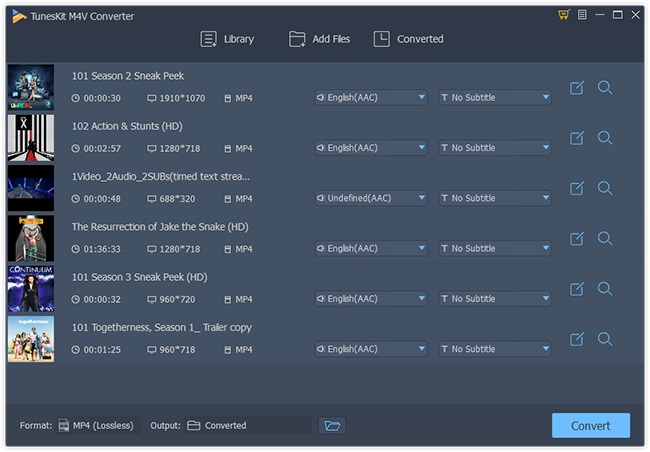
DRM from iTunes by opening Tuneskit DRM Media Converter. Press Add Files in order to get started and then wait until the
application scans the iTunes library. This is why you need to have all the videos on iTunes, because you can’t remove iTunes DRM
otherwise.
Step 2. Select the
desired videos and start the conversion process
Pick
the videos/movies that you want to remove iTunes DRM for and then press the
Convert button in Tuneskit. Remember that
this process can be a bit time-consuming,
so you can leave the app open while it does the iTunes DRM removal. Make sure
that you process all the desired files,
so triple check your iTunes DRM removal list before you start the process.
Step 3. Wait until
completion and start watching your videos
You
will have to wait until the process is complete, and then you can check the
Converted tab in Tuneskit. Here you can
find the converted files in a separate folder. The great thing about Tuneskit is that you can do fairplay DRM removal, but the app also keeps
your original files, which is very important to note. By pressing the
magnifying glass button, you will be able to find the current location of these
converted files.
In order to make sure that you got to remove iTunes DRM correctly, try
to play this in another video player aside from iTunes. This will help you test everything and see if you managed to remove
DRM in a proper manner or not.
Should you
use Tuneskit to remove DRM from iTunes?
If
you want a fast and reliable solution that will help you remove DRM from
iTunes, Tuneskit can be a magnificent fit. It will deliver you the help and value you need, not to mention it
works very well with a variety of video types as well. All you have to do is to
download Tuneskit, give it a shot and you
will find results to be second to none in the end. Don’t stick with the iTunes DRM,
opt for the best way to remove iTunes DRM fast and easy. Download Tuneskit now and get the ultimate fairplay DRM removal solution on the market!