How to Convert Audible AA/AAX Audiobooks to Plain MP3 Formats?
Audible.com is the largest online audiobook retailer and producer in the market currently. The audiobook files we purchased from Audible.com are all DRM protected and formatted as AA or AAX format.
You may have been wondering whether there's any effective way to get rid of the Audible DRM protection from its AA and AAX audiobooks by re-encoding them to other common audio formats, like MP3 so that you can enjoy the audiobooks on any media playing devices. Fortunately, the answer is yes. Currently the best solution to strip off DRM from AA/AAX audiobooks is to use a third-party audiobook DRM removal software which can easily bypass the DRM control of Audible AA and AAX audiobooks either with a sound recording or virtual CD burning method.
Actually, TunesKit DRM Audiobook Converter is an ideal program to help you get rid of the DRM protection from audible audiobooks and convert AA/AAX to MP3 format with 100% preserved quality.
Tutorial of how to convert aa/aax to unprotected MP3 format.
Step 1. Load AA/AAX to TunesKit Audiobook Converter.
You have to connect the audible account with iTunes at first, then the audible files will be imported to iTunes library automatically. You can select these audiobook files from iTunes library.
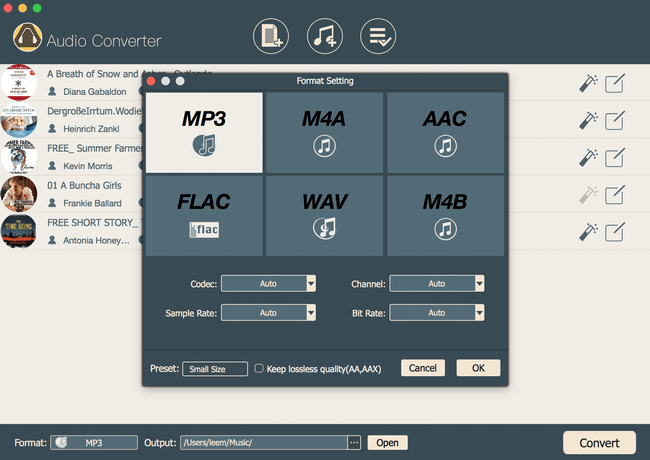
Step 2. Choose output formats as MP3.
Click gear icon to select the output formats as MP3.
Step 3. Click "Convert" button to start the AA/AAX to MP3 Conversion.

Comments