How to Transfer Data from Huawei Phone to Computer?
Transfer Data from Huawei to Computer.
Step 1. Set up your Huawei mobile phone
Install and launch Assistant for Android on the computer. Once this
software product has been installed and launched correctly, the user
can begin to connect the process of connecting the USB cable from the
computer to the Huawei phone.
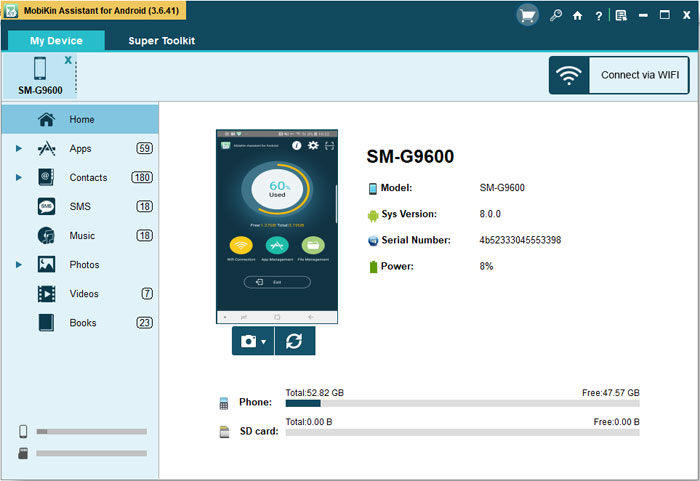
Step 2. Select the file types you want to transfer
After the USB cable been connected properly, the program detects the
connected Huawei phone automatically. Then, all the transferable file
types will be displayed on left and you will be able to preview the
files that will need to be transferred.
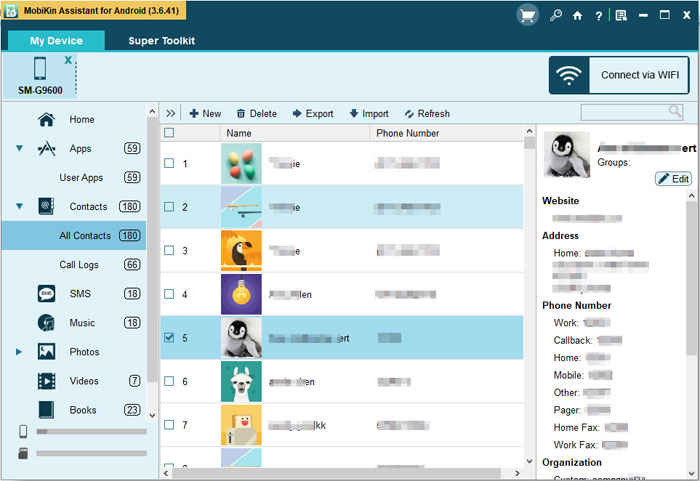
Step 3. Transfer data from Huawei to computer
The data that the user transfers can be selectively chosen by type
(i.e. text messages, music files etc), or all of the data can be
selected and then transferred to the connected computer by clicking on
the "Export" button.
Post Your Ad Here
Comments