How to Recover Data from Bricked Android?
When you look around, most people are holding smartphones in their
hands. Smartphones can be a helper in our daily life, it allows us to
make phone calls, send texts, and surf the internet, and we can work
with it , too. It is so convenient to use a smartphone in daily life,
but it would be annoying if it is bricked, especially when we are busy
using it. Sometimes, the phone is not responding to any commands, which
is called a bricked Android phone. With a bricked Android phone, all
your files are dormant and you will have a limited usage. Most people
concern how to recover data from a bricked Android phone. Here is a way
to handle with your unresponsive Android phone, with the help of a
tool, MobiKin Doctor for Android.
How to Recover Data from Bricked Android?
Step1: Run Doctor for Android program on computer
First of all, download, install and open the Doctor for Android program on your computer. Then, you can plug your bricked Android phone to the computer with a USB cable. Make sure you have opened the USB debugging on your Android device.
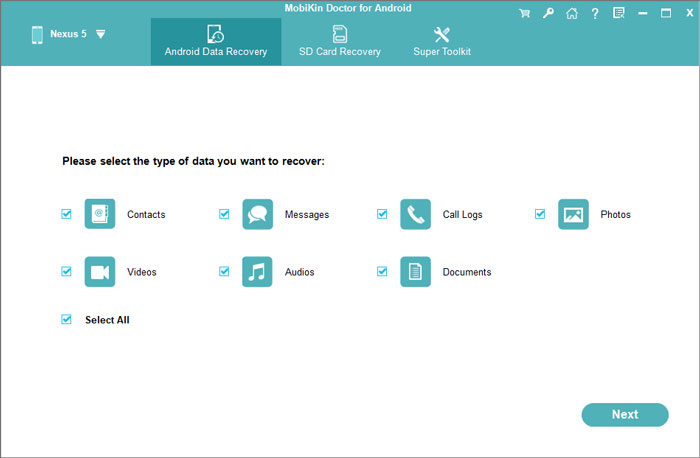
Step 2: Choose the file types to recover
Select what you want to recover in this step. You can either choose the specific file types by ticking them or directly tick "Select All" to recover them all.
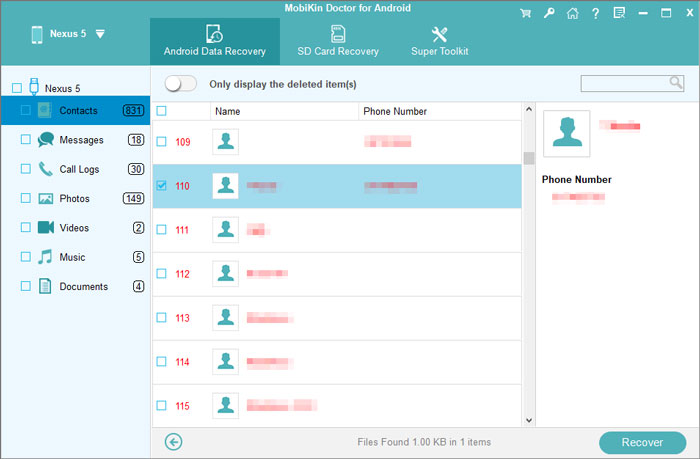
Step 3: Recover data from bricked Android
After you ticked off all the files you want back, you can hit "Recover" button to save them on your computer.
Advertise on APSense
This advertising space is available.
Post Your Ad Here
Post Your Ad Here
Comments