How to Import / Export / Edit Android Phone Contacts


First, please connect your devices via USB cables or WiFi following the instructions on the primary window.
Click on Contacts in the left column and on the Contacts page, then click the Import/Export button and choose a corresponding action from the drop-down list. Here you can import/export contacts from vCard files, Outlook Express, Windows Address Book, Windows Mail and Outlook 2003/2007/2010.
If you have stored some contacts in Gmail, Facebook or other accounts on your phone, MobileGo for Android lets you sync these contacts to your phone easily.
Find Duplicate Contacts
Click on the "De-duplicate" button to find duplicate contacts. Any duplicate contacts that have the same name, phone number or email will appear on your screen for your review. You can then click "Merge" to merge all the contacts or selected contacts.

Note: You can backup contacts before and restore contacts after merging duplicates.
How to Add a New Contact via Your PC
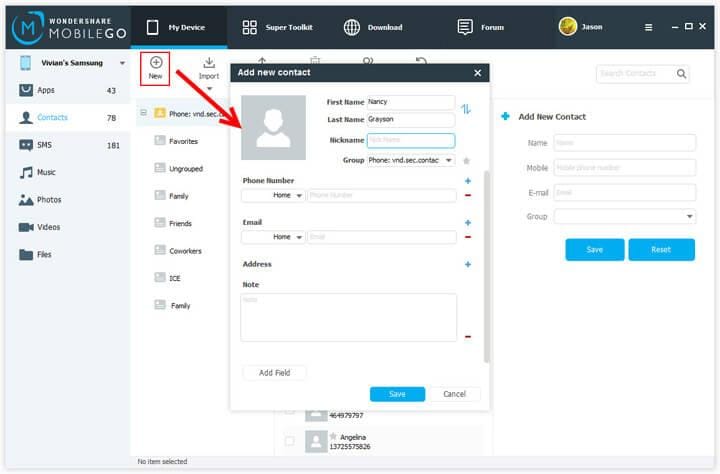
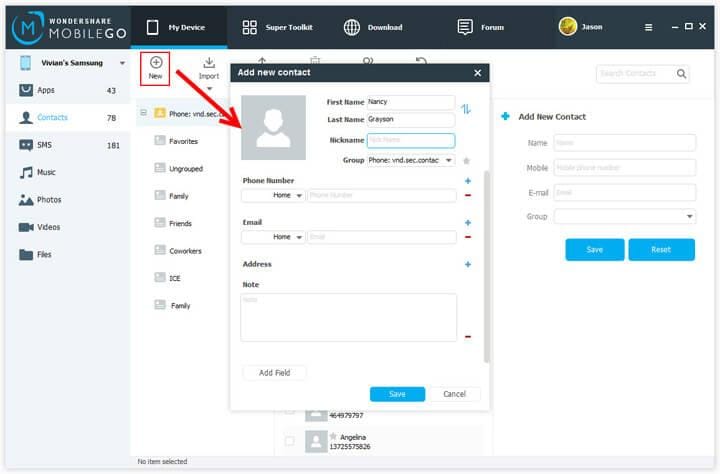
Add a new contact in the form on the right of the Contacts page or click "New" to open the "Add new contact" window. As you can see, you can edit name, email, phone number, website, address, middle name,etc.
Learn more: How to Import / Export / Edit Android Phone Contacts

Comments