Follow the Seven Simple Steps to Develop Apps without any Hurdles
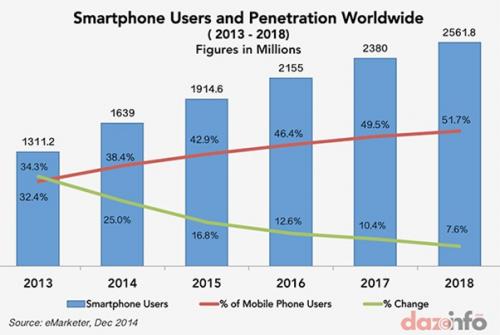 Day by day the number of mobile users is increasing. That’s why the demand of apps also increasing. To fulfil these requirements, we need more and more app developers. The graph shown at the last indicates the number of smartphone users per year.
As a beginner, to develop the first mobile app is not as easy as
it sounds to be. Many questions arise in the developer's mind while developing
the mobile app for the first time. This article gives step-by-step guidance about
the app development process.
Follow the
simple steps to build mobile apps without any hurdles:
1. Make a clear idea
There are many app categories available in the app store for example, Entertainment, Business, Health & Fitness, Game, Sports, Weather, etc. So the big question arises here, which type of app will get more popularity? To get the best solution of this question, you need to research about the real life problems that people are facing, pick one of them that make more sense and start to resolve that via your app.
2. Choose the right platform
It is very important for developers to know which platform is the best to develop the app. Here are some basic ideas about the platforms to ensure which is more suitable.
• iOS: For the profit purpose, choose the Apple App Store. A developer can get more price of an app on Apple App Store compared to other platforms. But to develop and publish an app for iOS, MAC system is mandatory. Apple App store charges $99 per year to the iOS developers to publish an app on it.
• Android: In the initial stage, it would be better to publish the app for free and earn from ads because a free app gets more popularity. Android Platform is the best platform to publish a free app because it has more users than other platforms. Perhaps, when the app gains enough popularity, developers can switch the gears.
• Windows: Might be the app development idea is already adopted by hundreds of apps on Google or Android platform, so it would be better to switch the platform. Granted that Windows 8 is less-explored territory, but developers can get the larger audience in a quick-time with Metro-styled apps as the discoverability of apps for Windows Marketplace would be much better than App Store or Play Store.
3. Design
Effective design plays an important role to make the app popular, so never overlook the design aspect to build the famous app. Here are some tips to make your app eye-catchy.
• App design for iOS: The readily available custom templates help to create a quick and effective design for iPhone app.
• App design for Android: Google puts everything in the public domain to design the app. Developers can get the Animation, Style, Layout, Components, Pattern, and Usability through the Material Design. Thus, it would be more convenient to convert the prototype model into actual app.
• App design for Windows: If developers have some scripting language experience, then it would be easier to code the design of the app using the HTML5 and CSS3. Also, beginners can learn how to design the app using the design portal given by Microsoft.
4. Registering and Downloading the required tools and SDKs
To build the app, developers require to do registration and need to download the tools and Software Development Kit (SDKs) for the particular platform.
• For iOS: To build the app for iOS platform, a developer need to do registration as an official Apple Developer without any registration fees. Then, a developer can download required SDKs and tools from the apple’s official download portal. Moreover, essential Xcode can be downloaded from Here. And last, a developer needs to pay $99 to publish the app.
• For Android: To construct the app for the Android platform, a developer need to do registration as an official Google Developer and requires to pay $25 per year to publish the app. And last, download the Android Studio and SDK tool. It’s an advice to choose a lower version of SDK as it would be compatible with many Android devices.
• For Windows: A developer need to do registration as a Windows developer to build the app for the Windows platform and requires to pay $49 per year to publish the app. Moreover, a developer requires to download SDKs and tools from the windows official site.
5. Coding It is the last step to build the app for a particular platform by using the native programming languages. Moreover, developers can build the native app by using the Cross-Platform native mobile app development tool like Configure.IT. Here are the list of supported languages to build the app for particular platform.
For iOS: Objective C and Swift
For Android: Java, XML, LUA
For Windows: HTML, CSS3 and C#
6. App testing
After completing the app development, a developer needs to test an app on real devices before publishing it on the app store. Because, every device has its unique screen size and internal hardware. There are lots of tools available to test the app, like Device Anywhere, Ranorex, SeeTest etc. Moreover, Tools can help to fix the bugs.
7. Submitting and Publishing the App
After completion of the testing process, app market tests the quality of the app before submitting it on the Store. Once the developer gets the approval from the community, app publishes on the App Store/ Play Store/ Market Place.
Now when the App is live on the app store, you just need to monetize it and check via reviews, what users want in your app as the extra features. Try to provide them in the next update.
The above points will surely clear the confusion that the new app developers are facing right now.

Comments