Phone Case Printing Machines for Small Businesses: What to Know Before You Buy
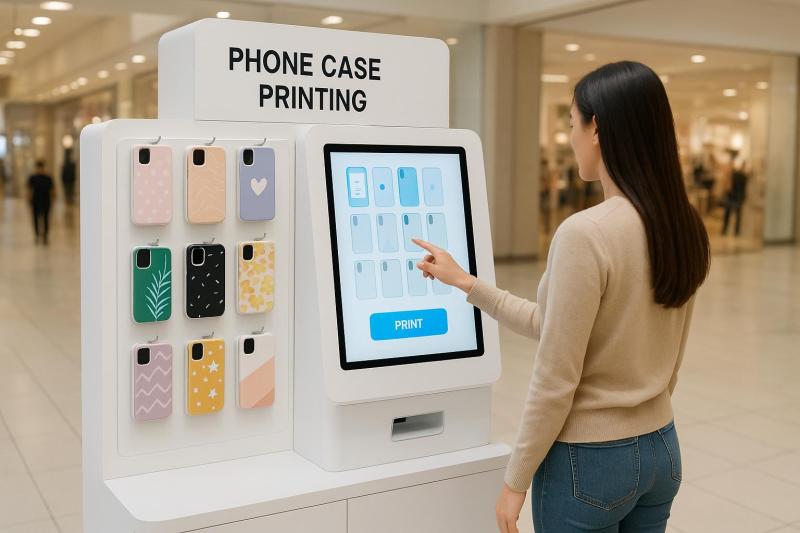
Starting a small retail venture today doesn’t always require a large investment or a full storefront. Many new owners are turning to on-demand printing technology, especially machines that allow customers to create their own phone cases. These kiosks and machines offer a steady foot-traffic draw in malls, events, small shops, and even convenience stores. If you’re thinking of entering this space, a custom phone case vending machine can help you build a business with a low entry barrier and predictable day-to-day work.
Before you make a purchase, here’s what you need to know so you choose the right machine, avoid unnecessary expenses, and set up a business that actually works in your market.
A Quick Look at Why Phone Case Printing Is Growing
Phone cases have moved far beyond simple protection. People now look for designs that match their style, interests, or the latest trends they see on social platforms. When shoppers can create their own design in minutes, the buying decision becomes instant. This makes phone case printing machines a steady source of impulse purchases.
For small businesses, the appeal lies in:
● Low daily operating needs
● Compact setup that fits in tight spaces
● Constant demand due to phone upgrades and replacements
● Interest from teens, young adults, and tourists
The business model is simple: buyers design, print, and collect their case on the spot. This speed and convenience keep the machine busy even during normal weekdays.
Key Features to Compare Before Buying
Machine quality varies widely. If you want long-term performance, compare these features carefully before spending money.
1. Printing Quality and Color Accuracy
The print output is the main element customers will judge. A clear, bright print can turn a one-time buyer into a repeat customer. Ask suppliers for sample prints or request a short demo video of the machine in action.
Look for:
● Clear lines without bleeding
● Even colors
● Strong adhesion that doesn’t fade after a few days of use
● Compatibility with most phone models
A good print result saves you from returns, complaints, and wasted case stock.
2. Supported Phone Models
Your machine should cover popular models from Apple, Samsung, and other leading brands. Some machines support dozens of variants, while cheaper units cover only a few.
More supported models = more revenue opportunities. Shoppers expect variety, especially in busy malls or areas with diverse customers.
3. Printing Speed
Customers don’t want to wait long for a case. A machine that prints slowly can lead to walkaways.
Typical small-business models take between 2–5 minutes per case. Anything longer than that can hurt sales during busy hours.
4. Software and User Interface
Customers must be able to pick a design, upload a photo, or type text without confusion. Even if your staff assists them, simpler software reduces errors.
Test the machine interface if possible. It should allow:
● Quick design upload
● Easy cropping and adjustments
● A smooth preview before printing
Basic software delays can add minutes to each purchase, reducing your daily output.
5. Material and Case Quality
The blank cases you use matter just as much as the machine itself. Low-quality shells break easily, fade quickly, or chip around the edges.
Choose cases made from sturdy TPU or hybrid materials that combine softness and protection. Higher material quality often leads to better customer reviews and fewer complaints.
6. Machine Durability and Build
Small businesses depend on reliable service. If your machine stalls often or needs frequent repairs, your earnings drop immediately.
Check for:
● Strong internal components
● Warranty coverage
● Easy access for cleaning
● A stable frame
● Replacement part availability
Always ask about post-purchase support. A supplier who responds quickly can save you hours of downtime.
7. Space Requirements
Measure your space before ordering. Some printing machines are compact countertop units. Others are tall vending-style kiosks designed for malls.
Pick a size that matches your environment—overcrowded displays discourage customers from stopping to browse.
Cost Breakdown: What You’ll Spend
Buying a phone case printing machine isn’t just about the upfront price. Here’s what to expect:
1. Machine Price
Most units range from $1,800 to $8,000, depending on size, printing method, and features.
Larger kiosk-style machines cost more, but they also attract more attention.
2. Blank Cases
Stocking blank cases is a recurring cost. Prices vary by material and supplier. Buying in bulk reduces your cost per unit and increases profit margins.
3. Printing Supplies
Some machines use ink cartridges, others use dye-sublimation sheets.
Calculate the cost per print so you understand your actual profit per case.
4. Maintenance
Monthly maintenance is usually minimal—mainly cleaning print heads or replacing small parts.
Still, keep a budget aside for occasional repairs.
5. Rent (If Applicable)
If you place your kiosk in a mall or store, expect a rental fee or commission-based agreement.
Many small business owners place machines in:
● Shopping malls
● Tourist spots
● Mobile accessory shops
● Salons
● Convenience stores
Commission sharing often ranges between 10–20%.
Earning Potential: What Small Business Owners Can Expect
Your earnings depend on:
● Foot traffic
● Selling price per case
● Your stock range
● Printing speed
● Marketing and visibility
On average, small phone case printing setups charge $15 to $40 per case depending on location and case type.
Daily sales of even 5–10 cases can bring solid monthly revenue. In busy malls or at events, numbers can go much higher.
The key is location. A machine placed in an active area can pay for itself quickly, while one placed in a quiet area may take longer to break even.
Tips for Getting More Sales
These simple steps can help increase daily traffic:
1. Display Sample Designs
Showcase trending designs related to movies, popular phrases, sports teams, or local themes. People like seeing what the machine can do before they commit.
2. Offer Limited-Time Themes
Special designs during festivals, events, or seasonal promotions help draw new buyers.
3. Keep Cases Organized
A clean and organized display encourages browsing. Arrange cases by brand so customers find what they need fast.
4. Add a Small Signboard
Clear directions like “Print Your Own Phone Case in Minutes” attract passing shoppers.
5. Partner With Local Shops
Shops with high foot-traffic benefit from having your machine, and you benefit from ready customers.
Final Thoughts
Phone case printing machines open the door for small business owners who want a practical retail venture with steady demand. By comparing printing quality, case compatibility, software, durability, and operating costs, you can make a smart choice that fits your goals. Take your time to evaluate options, test sample prints when possible, and pick a machine that works well for your target crowd. With the right setup, this business can bring consistent daily income and strong repeat customers.
Post Your Ad Here
Comments