How to Create a Modern Custom Audio Player for Your Website
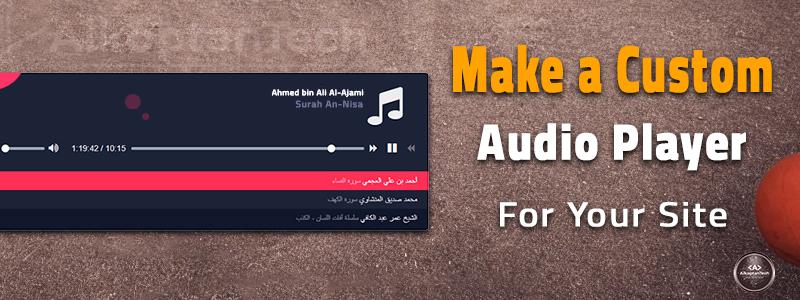
Adding audio to a website is more than just embedding a track - it’s about giving visitors a seamless and enjoyable listening experience. While browsers come with their own default audio players, they often look outdated and lack flexibility. This is where a custom audio player becomes a real game-changer.
In this article, we’ll explore why a custom audio player matters, what features it should include, and how you can build one from scratch. At the end, you’ll also find a link to the full tutorial with working code so you can implement it directly on your site.
Why Choose a Custom Audio Player?
If you’re serious about user experience, relying on the browser’s built-in player is not enough. Here’s why a custom audio player is a better option:
-
Design Freedom: Match the player with your site’s branding and style.
-
Lightweight & Fast: No heavy third-party plugins that slow down loading speed.
-
Extra Features: Add playlists, progress bars, volume sliders, or album art.
-
Full Control× Clean JavaScript that you can maintain and customize anytime.
A custom audio player makes your website look modern, professional, and user-friendly.
- Ahmed bin Ali Al-Ajami Surah An-Nisa
- Muhammad Siddiq al-Minshawi Surah Al-Kahf
- Omar Abdel Kafi Tongue diseases series
Key Features of a Modern Audio Player
A well-built audio player should include:
-
Play & Pause Controls: The core functionality.
-
Previous/Next Buttons: For playlists or albums.
-
Progress & Seek Bar: Let users jump to any part of the track.
-
Volume Control with Mute: Simple and intuitive sound adjustment.
-
Track Info Section: Show song title, artist name, or cover image.
-
Responsive Layout: Works perfectly on desktop and mobile devices.
These features turn a basic player into a professional tool that keeps users engaged.
How to Build One
Building your own player is easier than it looks. You only need:
-
HTML for the structure (audio tag, controls, playlist).
-
CSS for the design (buttons, progress bar, responsive styling).
-
JavaScript for the logic (play/pause toggle, track switching, volume handling).
The main trick is to structure your code cleanly and define functions before attaching them to events. This avoids errors like having the player load twice or controls not working.
Get the Full Tutorial with Code
We’ve covered the basics here, but if you want a ready-to-use example, I’ve published a step-by-step tutorial with the complete code on my website.
⚡ Get the source code here - Create a custom audio player for your site
Final Thoughts
A custom audio player isn’t just about playing music it’s about creating a better user experience. By designing your own player, you gain full control over both functionality and design, making your website stand out.
If you’re building a music site, a podcast hub, or even a personal blog, implementing a professional audio player is one of the smartest upgrades you can make.
Alkoptan Tech | Trust . Excellence . Creativity



Comments (43)
Lusa Life6
Lusa Life Premium Pet Store
The article correctly identifies the core benefits of custom players (design freedom, speed, and feature control) and the essential technology stack (HTML5 tag, CSS, and vanilla JavaScript). For a production-level implementation.
Raul Smith9
Blogger
True. By designing your own player, you gain full control over both functionality and design, making your website stand out.
Anshu Yadav6
Service Providers
Don't just play audio curate an experience. A custom audio player allows you to design every interaction, ensuring it aligns perfectly with your brand and captivates your audience, making your site memorable and unique. Really cool tutorial! The custom audio player idea is well explained and can add a nice touch to any site. Thanks for sharing definitely going to try this out.
Janam Patri8
Astrologer
Want to Create a Modern Custom Audio Player for Your Website this is the best place for you.
3D Modeling6
3D Modeling Animation Studio
By designing your own player, you gain full control over both functionality and design,
Lusa Life6
Lusa Life Premium Pet Store
Excellent article. Now I create a custom audio player
Lily Amelia7
Don't just play audio curate an experience. A custom audio player allows you to design every interaction, ensuring it aligns perfectly with your brand and captivates your audience, making your site memorable and unique.
Olivia Brown9
Manager
Great post! Thanks for sharing this post. It is truly helpful.
Box Agency4
Custom Boxes-Packaging Manufacture
A custom audio player making your website stand out.
If you’re building a music site, a podcast hub, isn’t just about playing music it’s about creating a better user experience. By designing your own player, you gain full control over both functionality and design, making your website stand out
Cris Reconco7
Commercial and Residential Cleaning
A custom audio player isn’t just about playing music it’s about creating a better user experience. By designing your own player, you gain full control over both functionality and design, making your website stand out.
Noah Smith8
Marketing Manager
Great post! Thanks for sharing this article with us...
Farro & Co6
Citizenship By Investment
A very practical guide! Clear steps, great design focus, and useful customization tips. Perfect for improving user experience and branding with a professional, modern audio player on any website.
Laboratory Instrumen...7
This guide on creating a modern custom audio player is clear and practical. I love how it balances design and functionality—perfect for enhancing any website’s user experience.
Aashika Yadav6
Services
Good infor on Custom Audio device. Cool article very practical and well explained! The custom audio player idea is a neat touch, and the step-by-step guide makes it approachable even for those newer to coding. Thanks for sharing ?
MyFx Signal6
Trade Smarter with My Fx Signal
Cool article very practical information on Custom Audio Player
We Buy Diamond13
Specialist Buyer
Great guide — clear, practical, and shows how building a custom audio player gives your site a professional edge
Aliya Shahzadi9
Really good content like it
We Buy Diamond13
Specialist Buyer
Good infor on Custom Audio device
Stefan Morgan7
Tree Surgeons
Great information on Custom Audio Player
Bhagwati Packers7
Best Packers and Movers in Noida
This is a really insightful article! I like how you highlighted both the importance of user experience and the flexibility that comes with building a custom audio player. The breakdown of key features like playlists, progress bars, and responsive design was super helpful. I especially appreciate the reminder that custom players not only look modern but also improve performance compared to heavy third-party plugins. Definitely bookmarking the tutorial link to try it out on my own site—thanks for