Beginner’s Guide: How to Design Banners with a Banner Editing App
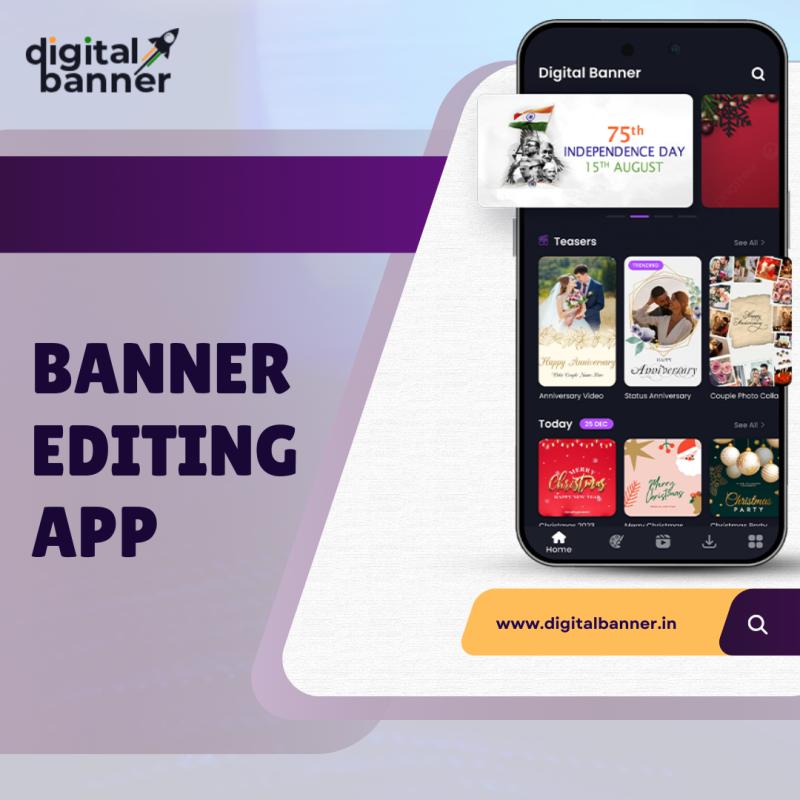
In today’s digital world, banners are essential for marketing, advertising, and promoting products or services. Whether you're designing a banner for your website, social media, or a paid advertisement, having the right tools is crucial. One such tool is a banner editing app. Banner editing apps are designed to simplify the design process and enable users, from beginners to professionals, to create eye-catching banners quickly and easily.
In this comprehensive guide, we’ll take you through everything you need to know about designing banners using a banner editing app. We’ll cover the basics, key features to look for in an app, and step-by-step instructions for creating stunning banners. Whether you’re promoting an event, launching a product, or improving your social media presence, this guide will help you get started with the right tools.
Why Use a Banner Editing App?
Before diving into the details of designing banners, it's important to understand why a banner editing app can be an indispensable tool. A banner editing app offers several advantages, especially for beginners or those without a graphic design background. Here are some of the key benefits:
User-Friendly Interface: Most banner editing apps are designed with simplicity in mind. They offer intuitive drag-and-drop features, pre-made templates, and easy-to-navigate tools, making them suitable for users at all levels.
Cost-Effective: Compared to hiring a professional graphic designer or purchasing expensive design software, banner editing apps are often more affordable or even free. Many apps offer premium features that are still reasonably priced.
Time-Efficient: With pre-designed templates, automated design features, and customization options, a banner editing app can drastically reduce the time needed to create a professional-looking banner.
Variety of Design Options: These apps often provide a wide range of templates, fonts, images, and icons that you can use to customize your banners, giving you a variety of creative possibilities.
Mobile Accessibility: Many banner editing apps are mobile-friendly, meaning you can create banners on the go, which is especially useful for social media marketing.
Step 1: Choosing the Right Banner Editing App
The first step in designing your banner is choosing the right banner editing app. The market is filled with a variety of options, each with its own unique set of features. Some apps cater to beginners with easy-to-use interfaces, while others are better suited for more advanced design work. Here are a few factors to consider when choosing the right app for your needs:
Ease of Use: If you're a beginner, you'll want an app that is simple to use. Look for apps with drag-and-drop features, pre-designed templates, and intuitive navigation.
Customization Options: Ensure the app offers a wide range of customization tools, such as font styles, color schemes, and the ability to upload your own images or logos.
Templates and Resources: Some apps offer a library of templates that can help you get started quickly. Having access to high-quality templates can save you a lot of time in the design process.
Device Compatibility: Many banner editing apps are available on both Android and iOS, so make sure the app you choose is compatible with the device you're using. For example, apps like Digital Banner are available for Android, while apps like Digital Banner on iOS are perfect for Apple devices.
Pricing: Some banner editing apps are free, while others offer premium versions with additional features. Be sure to check the pricing structure to ensure it fits within your budget.
After considering these factors, you can choose a banner editing app that aligns with your design needs. A good example is the Digital Banner app, which is available on both Android and iOS. It provides an array of tools that make banner creation easy, even for beginners.
Step 2: Setting Up Your Banner Project
Once you’ve selected the app, it’s time to start designing your banner. Here’s a step-by-step guide to help you set up your first project.
Open the App and Create a New Project: Open the banner editing app and look for an option to create a new project. Most apps will prompt you to choose the dimensions of your banner. You can either choose from standard banner sizes (such as 728x90 pixels for display ads or 1200x628 pixels for social media posts) or input custom dimensions if you have specific size requirements.
Choose a Template or Start from Scratch: Many banner editing apps come with pre-designed templates for different types of banners, including promotional, event, and product banners. If you’re new to banner design, selecting a template is an excellent way to get started. Templates help you structure your design without the stress of starting from a blank canvas. You can always customize them to fit your needs.
Select a Background: The background of your banner is crucial to setting the tone of your design. Most apps will allow you to choose from solid colors, gradients, or image-based backgrounds. You can upload your own background image or choose from a library of stock photos if the app provides one.
Adjust Banner Dimensions and Layout: Some banner editing apps offer features like grids or guides to help you arrange elements within your banner. These can help you maintain a clean and balanced layout. Ensure that text, images, and other elements are well-spaced to create a visually appealing design.
Step 3: Customizing Your Banner Design
Now that you’ve set up the basic structure of your banner, it's time to customize it to suit your needs. Here’s how to personalize your banner design further:
Add Text: Text is often the focal point of a banner. Use bold and concise copy that clearly communicates your message. Most banner editing apps provide a variety of font styles, sizes, and colors to help you choose the right look for your text. Experiment with different font pairings, but try to keep it simple and legible. Avoid using too many different fonts to ensure a cohesive design.
Incorporate Images and Logos: High-quality images and logos can make your banner stand out. Upload your own images or choose from the app's library of stock images. If you're designing a banner for a business, ensure your company logo is placed prominently. Make sure the images are high-resolution and properly aligned within the banner for the best effect.
Use Icons and Graphics: Most banner editing apps allow you to add icons, shapes, and graphic elements to your design. These elements can help break up the text and add visual interest. For example, if you're promoting an event, you could use icons like a calendar or ticket to make your banner more dynamic.
Play with Colors: Color plays a significant role in the overall aesthetic of your banner. Most apps allow you to customize the color palette of your design. Try to use colors that match your branding, and make sure there’s enough contrast between the background and text to ensure readability.
Add Call-to-Action (CTA): If your banner’s goal is to prompt the viewer to take action, such as clicking a link or purchasing a product, include a strong call-to-action (CTA). Phrases like “Shop Now,” “Learn More,” or “Get Started” are simple but effective CTA examples. Make sure the CTA is easy to spot and stands out on the banner.
Step 4: Finalizing and Exporting Your Banner
Once you're happy with your design, it's time to finalize your banner and export it. Here’s how to prepare your design for use:
Preview Your Banner: Before exporting, always preview your banner to check for any errors or inconsistencies. Ensure the text is readable, images are clear, and the design elements are properly aligned.
Make Adjustments: If you notice any issues with your design, make the necessary adjustments. For example, if the text is hard to read against the background, change the color or size. If the images are pixelated, replace them with higher-resolution versions.
Export Your Banner: When you’re satisfied with your design, it’s time to export it. Most banner editing apps will offer options to export your banner in various formats, such as JPEG, PNG, or even GIF. Choose the format that best suits your needs (JPEG and PNG are the most common for web banners).
Save Your Work: It’s always a good idea to save your work in the app’s format as well, especially if you plan on editing the banner later. This will allow you to go back and make changes without starting from scratch.
Step 5: Using Your Banner
Now that your banner is designed, it’s time to put it to use. Here are some common ways to use your banner:
- Website Banners: Upload the banner to your website to promote products, events, or special offers.
- Social Media: Share the banner on social media platforms like Facebook, Instagram, or Twitter to increase engagement and visibility.
- Email Campaigns: Use your banner in email marketing campaigns to drive conversions.
- Online Ads: Use your banner for online advertising on platforms like Google Ads or display networks.
Conclusion
Designing banners with a banner editing app is a powerful and efficient way to create professional, eye-catching visuals for your business, event, or promotion. By following the steps outlined in this guide, you can easily create a banner that not only looks great but also serves its purpose—whether that's driving traffic, increasing sales, or enhancing your brand.
Choosing the right banner editing app, such as Digital Banner, is key to getting the best results. These apps offer a range of customizable features, templates, and tools that make banner creation accessible to anyone, even those with little to no design experience. With the right app and a little creativity, you can start designing banners that make a real impact on your audience.
Remember to always consider your goals, audience, and branding when designing your banners, and don’t hesitate to experiment with different styles and layouts until you achieve the perfect design! Happy designing!

Post Your Ad Here
Comments