What to take into account at the time of building a custom 4x6 template design file
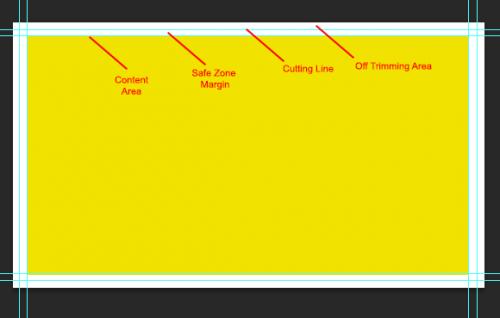
At the time
of creating a new image, with the intention of using it as a base template file
for a future design, there are many factors that has to be taken into account,
no matter what design software you are using, these are general rules that
every designer or person creating a design for a 4x6 club flyer, should follow.
Size: If
you are interested in the 4x6 (inch) which has become the standard size for the
club flyers these days, you should create the file not just 4 inch by 6 inch,
because you are not leaving the bleed area (space of the design outside of the
cutting edge to give the cutter a range of margin and avoid tiny white lines at
the time of cutting) as supposed, so you add an additional 0.25” to the width
and height, giving you a total of 4.25”x6.25”.
Quality:
Depending on the software you are using, you might get asked about the
resolution of the image, this is also called DPI, and here we will set this up
to 350 pixels DPI resolution for best quality. You will notice files are going
to be heavier with this resolution, but as well will contain better details and
quality.
Color
settings: Instead of the so popular RGB, we will recommend you to change it to
CMYK which is the color separation technique used by the printers at the time
of creating the plates used by the offset machine. The colors will look a bit
pale and not as nice as the RGB, but the fidelity will be more accurate to what’s
going to be printed instead of just what you are seeing in your desktop screen.
Guidelines:
There are a few guidelines that need to be added, like the cutting edge
guideline and safe margin zone for text and images, this is usually done dragging
reference lines from the rulers into the image area, not all software’s are
capable of doing so, and we recommend Photoshop and Illustrator.
Following
these easy recommendations you will for sure avoid having your club flyer order delayed or
cancelled until further noticed, also avoid possible fees for fixing the art
file to a ready-to-print state.





Post Your Ad Here
Comments (4)
Jeet Nath1
SEO & SMM Expert
Nice info. Thanks for sharing this.
Caleb Mihovil1
Social Media Marketer
Really awesome info about design and this pic is so nice. Thanks @Jean Francois for sharing this. Carry on.
Jean Francois1
Printer Writer
Thank you Haile! :) will be building more tutorials sometime soon, if anything in particular you want to see, let me know.
Haile Barnes1
Graphics
Nice tips. Great to know.