The Elements of Mobile Designing which caters Information Architecture
Information Architecture lays the foundation of your mobile product. It has turned to be challenging than ever. A product carrying good visual design can be unsuccessful if it has poor information architecture.
One should be easy to find, navigate and understand from the glut of information available today. But it should be able to provide familiar and coherent experience to the users across multiple channels of communication from the Web to other IOT devices like smartphones, smartwatches, etc.
The truly successful mobile products always have a well-planned information architecture. The mobile information architecture defines how the people interact with your information and how it is structured. It requires a keen-witted planning with different devices as every device has different capabilities. The information architecture also focuses on how you address context. In a quick summary, we can say that a good information architecture is based on the various user contexts. It not about a website or architect software, it just has a few additional challenges that every mobile app development company is facing.
The Elements of Mobile Design
Good design requires three things: Visuality, ability to display that vision into something for others to see, use, or participate in and lastly, knowing how to utilize the medium to achieve your design goals. Apart from these elements, there are six elements of mobile design which is required to be considered.
1. Context
As the designer, make sure that the user can figure out how to address context using your app. Ask yourself following questions.
- Who are your users? And how much you know about them?
- What is occurring? And under what circumstances does your user will get engaged with your content.
- When will they communicate?
- What is the location of the users?
- What value will they get from your content or services?
- How are they using their mobile device?
Think of these questions and serve these issues as your checklist to your design from start to finish.
2. Message
Another design element is your message. It is nothing but the mental impression you create explicitly through visual design. But do not get confuse with branding. Branding serves to reinforce the message with authority, not deliver it.
Your approach to the design will define that message and create expectations. A sparse, minimalist design with lots of white spaces will tell the user to expect a focus on content. A “substantial” design with the use of dark colors and lots of graphics will tell the user to expect something more immersive.
3. The Appearance
The look and feel are subjective and hard to define. It defines the aura of the mobile design. But it is different from messaging. Messaging is holistic, as it is the expectation of how users will address their context. But a designer should understand the difference between the two. The appearance can be interpreted to mean the emotional reaction to design and the role of messaging. It comes from with the design inspiration.
4. Layout
It is an essential design element. It is how the user processes the page, but the structural and visual components of layout often get merged, creating confusion and making your design harder to produce. Creating mobile models in an environment with multiple reviewers at the right time. Your job is to create a manifestation of a shared vision. The layout is one of the elements you can present early on and discuss independently.
5. Color
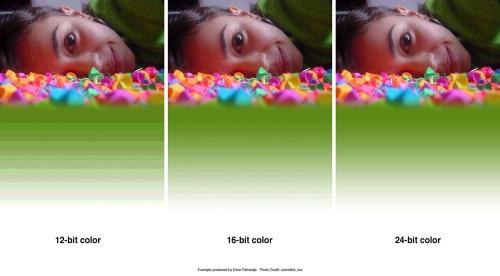
The fifth design element is color. Earlier the mobile screens were available only in black and white. Now we have nearly the entire spectrum of colors. The
mobile screens are the most common obstacle you encounter when dealing with color. When combined designs are presented on different mobile devices, it can
cause banding or unwanted posterization in the image.
The image below states how dramatically the color depth can affect the quality of a photo or gradient, producing banding in several parts in the image.
6. Typography
The sixth element of the mobile design is typography. Traditionally in mobile design, you had only one typeface. The only control over the presentation was the size. As devices improved, so did their fonts. Higher-resolution screens allowed for a more robust catalog of fonts than just the device font.
Conclusion
Mobile user experience is an on going development field and caters huge opportunity for improvement in future. Here is an overview and basic elements of the mobile user experience which provide Information Architecture. Focusing on these individual elements will help you to create great overall mobile user experiences for your users.
Post Your Ad Here
Comments