Photo Stamp Remover, remove watermark, date stamp, unwanted objects from photos
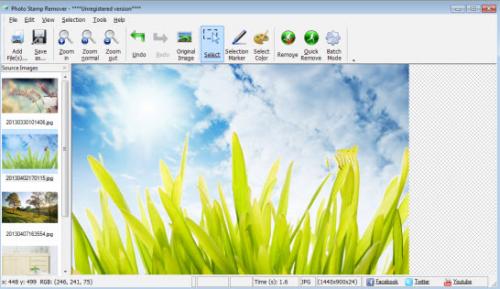
Photo Stamp Remover
is a time-saving application that offers a full automatic photo
correction process to remove watermarks, date stamps and other unwanted
objects on photographs in just few short minutes. The program utilizes
an intelligent restoration technology to fill the selected area with the
texture generated from the pixels around the selection, so that the
defect blends into the rest of the image naturally.
Great benefits of Photo Stamp Remover
Remove unwanted artifacts from new photos
Cleanly
erase unwanted artifacts like date stamps, watermarks, logos and other
objects. The program also helps clean up face and skin imperfections
such as wrinkles, acne and tattoos.
Restore photos to its original state
Automatically
fill the removed artifact with generated texture to make your photos
look natural as if it had always looked like this.
Rejuvenate old photos
Scan
scratched and dirt accumulated old photos into computer and then use
the software to clean up scratches, cracks and dust spots.
Select object to remove by color
Manually
select the unwanted artifacts and specify the color to remove the
artifact that has the same color. For example, you can remove a
photograph text and data stamps that have the same, solid black color.
Remove defects with simple steps
All
you need to do is just open a photo in the program, select the area
that needs to be removed and then click Preview. If you are satisfied
with what you see, click Start. And the program will automatically
remove the imperfection and defect blend into the background cleanly
with its advanced restoration algorithm.
Retouch more than one photo
The
batch mode function enables you to process multiple photos at a time.
For example, you can remove date stamp left on several photos together.
Without installing large photos editors
Save
the money and time of everyday, casual camera owner to buy a more
feature-rich photo editing suite and confused with its user manual to
get started.
Simple guides to remove watermarks, data stamps, logos, etc from photos?
1.Install and launch Photo Stamp Remover app on your computer.
2.Add source image to the program.
Click
File->Add File(s) menu items to add image files to the list or click
File->Add Folder button to add a folder, and the image files will
be added to the Source Images list on the left pane of the program. And
the Image preview area displays one of the files from Source Image list.

3.Remove unwanted objects.
1) Select the area with unwanted objects using the tools of Rectangular selection or Marker selection.

2)Click the “Select Color” tool and enable the “Specify stamp color” checkbox to specify the color of the object to remove. And in this case, only pixels of this color will be removed. And you can use this color selection option to remove solid-color or non-transparent objects.

3)Click the “Remove” or “Quick Remove” button to preview the results, if you are satisfied with the results, click the “Save as” button.

Post Your Ad Here
Comments