How To Use Vinyl Graphics To Make Amazing Papa Bear Shirt Decal
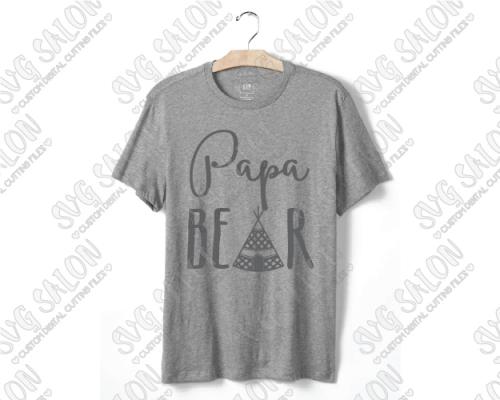
When it comes to using SVG files to design your t shirt, the options are simply endless. You can use iron on transfer or the vinyl decals. Iron on transfer is simple but the white colour may not come out very well
The problem with iron on transfer:
Iron on transfer produces amazing results if you want to imprint family bear shirts. However, you have to contend with the fact that if you use the game printer for printing the iron on transfer then white will not come out. The printer will leave out the white and that means the colour of the fabric will show in the place of white. The very light colours can also appear transparent and this means the end result will be muddy.
Thus, for the best iron on transfer result, you
should stick with dark, solid colours which show the contrast of the
bear image against any fabric. However, this does not mean you cannot
imprint white with iron on transfer. If you plan to imprint the bear
image on dark fabric or dark coloured shirt, you need special iron on
transfer paper which has white background (rather than the
traditional background) which allows light and white colours but note
that this has some other restrictions.
Why vinyl?
You can dress up plain fabric or t shirt with vinyl decals. The simple project is great if you want to make papa bear shirt for your family. The following is a simple procedure on how to do it.
Choose the right vinyl:
The first strep is choosing the preferred iron-on vinyl colours. Cricut products are good but these days they are affordable vinyl products particularly if you want to freely handle the design and do not need to run the design through cutting machine. Ironed graphics of this finished product are generally flexible, soft and most importantly, working with the materials is very easy.
Cut the desired papa or family shapes:
To cut wonderful graphics you need to acquire expensive machine. In general, the cut shape will have matte side and shiny side to vinyl after unrolling it. It is the matte side which presses against the shirt when it is positioned for ironing. The shiny side easily peels away, leaving permanent matte family bear design.
Position the vinyl:
Once you have cut the desired family bear design, position it on the shirt you want to transfer the image on.
Apply iron to the graphic:
Apply paper such that it fully covers the graphic. It should be enough to disperse heat and ensure the vinyl bonds to fabric. Iron settings may vary so you need to check it regularly to ensure the vinyl dose not over melt.
Once you are done with the above steps, just
remove plastic cover and wear your papa bear shirt.

Post Your Ad Here
Comments