How to retrieve deleted messages on iPod touch 4
"My son deleted his text messages out of his iPod Touch 4. I want to know if there is any way to get any of his deleted messages back. - Austin"
If you deleted messages from iPod Touch 4 by accident and no other Apple device logged in with the same Apple ID, don't give up to recover deleted files on iPod Touch 4. iPod Data Recovery can help you.
To retrieve deleted message on iPod Touch 4, we highly recommend you Aiseesoft FoneLab. It is the perfect tool for you to recover deleted and lost iPod files including Messages, Notes, Safari, Calendar, Reminders, Voice memos, Camera Roll, Photos and so on.
Three steps to teach you how to recover deleted message on iPod Touch 4.


Step 1: Install and launch the program
Download this iPod touch 4 data recovery software and install it on your computer. Then open it and you can see the interface as below.
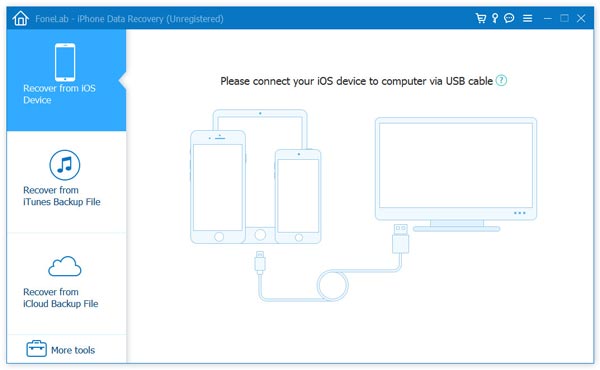
Step 2. Connect your iPod Touch 4
Connect your iPod Touch 4 to computer via USB cable and click "Start Scan" button on the interface.
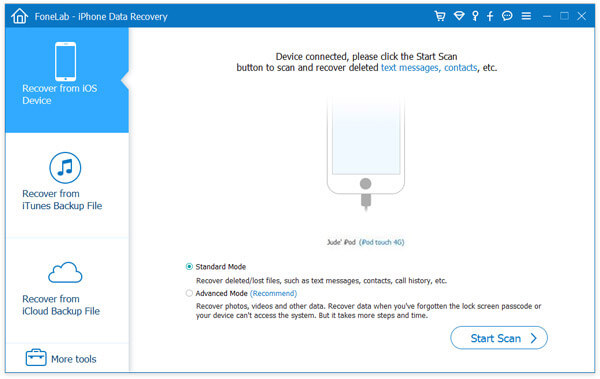
You need to download a plugin and follow the three steps below to enter the scanning mode.
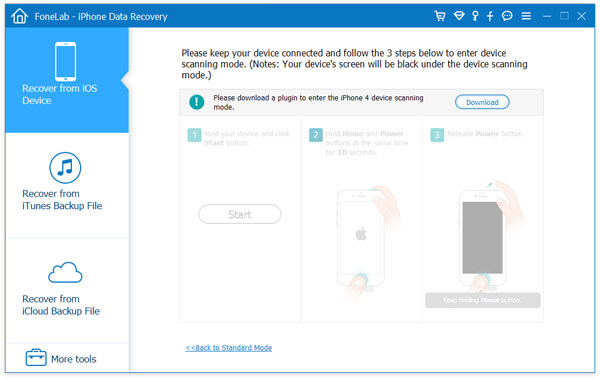
1. Hold your iPod Touch 4 and click "Start".
2. Press and hold the Power and Home buttons at the same time for exact 10 seconds.
3. Release Power button and keep the Home button pressed for another 15 seconds.
Step 3. Recover iPod Touch 4 massages.
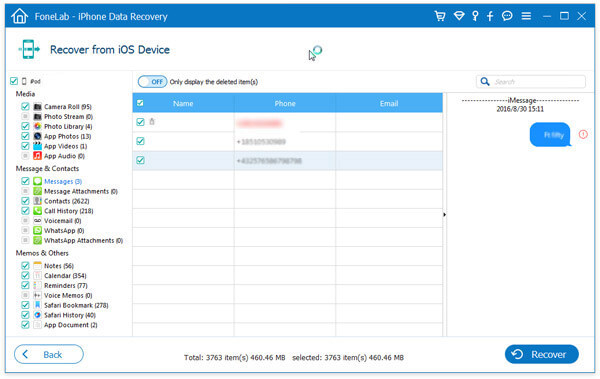
After the files scanning, detailed files of iPod Touch 4 will be displayed on its main interface. You can preview and select which message needs be retrieved and click "Recover" button to start to get your messages from iPod Touch 4 back.
Tutorial: How to retrieve deleted messages on iPod touch 4


Comments