How to Create Round JButton in Swing
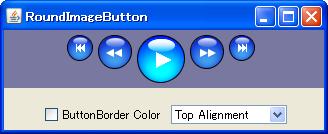
JButton creates a button by pasting a circular image.
- Circular, the same size of PNG is an image (outside of the circle is transparent color) providing three types JButton set to
- setIcon
- setPressedIcon
- setRolloverIcon
- setContentAreaFilled (false) Set the like, it does not draw the button itself
- Recommended, to match the minimum, maximum size to the size of the image
- However, to draw a line edge, from vertical and horizontal image size 1px larger as EmptyBorder has set
- It contains Override, if you click on the outside of the circle button so as not to react
- In this sample, and not necessarily that is generating the circle from the transmission color of the image, and prepares separate circular shapes the size of the image
- From the image of the transparent color, to set a clickable area, change the shape definition of the JComponent see
- paintBorder Override, original edge to draw your own circle with a line of its width without drawing
For more and full coding :
http://geekonjava.blogspot.com/2015/07/create-round-jbutton-in-swing.html

Comments