How to configure dhcp server in Linux

Posted by NAGARAJAN S.
3
Apr 4, 2016
207 Views
DHCP, or Dynamic Host Configuration Protocol, allows an administrator to configure network settings for all clients on a central server. The DHCP clients request an IP address and other network settings from the DHCP server on the network. The DHCP server in turn leases the client an IP address within a given range or leases the client an IP address based on the MAC address of the client's network interface card (NIC). The information includes its IP address, along with the network's name server, gateway.

Configure dhcp server:
In this example we will configure a dhcp server and will lease ip address to clients.
For this example we are using three systems one linux server one linux clients and one window clients.
dhcp rpm is required to configure dhcp server. check it if not found then install
1 

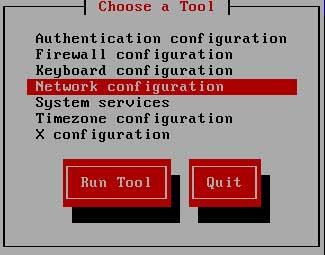
Now check dhcpd service in system service it should be on
#setup
Select System service
from list [*]dhcpd
To assign IP to dhcp server:
DHCP server have a static a ip address. First configure the ip address 192.168.0.254 with netmask of 255.255.255.0 on server.
Run setup command form root user
#setup
2
this will launch a new window select network configuration
3 
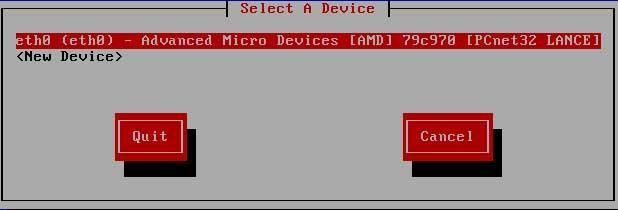
now a new window will show you all available LAN card select your LAN card ( if you don't see any LAN card here mean you don't have install driver)
4 
assign IP in this box and click ok
5 

click on ok, quit and again quit to come back on root prompt.
restart the network service so new ip address can take place on LAN card
#service network restart 
main configuration file of dhcp server is dhcpd.conf. This file located on /etc directory. If this file is not present there or you have corrupted this file, then copy new file first, if ask for overwrite press y
6
now open /etc/dhcpd.conf
7 
default entry in this file look like this 
8 

make these change in this file to configure dhcp server
remove this line # - - - default gateway
set option routers to 192.168.0.254
set option subnet-mask to 255.255.255.0
option nis domain to example.com
option domain-name to example.com
option domain-name-servers to 192.168.0.254
range dynamic-bootp to 192.168.0.10 192.168.0.50;
After change this file should look like this 
9

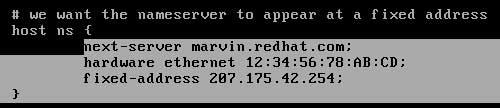
how to assign fix ip address to any host:
locate this paragraph and change hardware Ethernet to client's mac address and fixed -address to ip address which you want to provide that host
10
after making necessary change save file and exit
now create a blank file use to store the allocated ip address information 
11 
Now restart dhcpd service and on it with chkconfig commands
12 
Linux Client configuration:
Client configuration is very easy and straightforward. All you need to do is set ip address to dynamic in the properties of lan card. In linux
#setup
select network configuration from menu list
Select lan card and enter on ok
Select USE DHCP and enter on ok
Now click on quit
and quit to come back on root prompt
Now restart the network service to obtain ip from dhcp server
13
Window Client configuration:
To configure windows system as dhcp clients open lan card properties and select tcp/ip and click on properties and set obtain ip address automatically
14 
Go on command prompt and check new ip address 
15
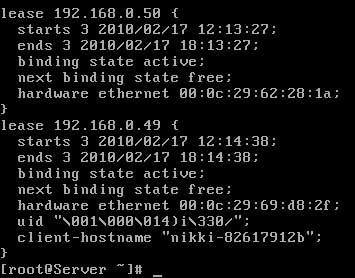
Check lease on DHCP server:
you can check allocated address on server.
16
17

2 people like it
avatar avatar
Comments
avatar
Please sign in to add comment.
Advertise on APSense
This advertising space is available.
Post Your Ad Here
More Articles