How to backup android text messages to computer?
As you know, SMS is the basic function of a
mobile phone, and we are used to send text messages on many occasions.
Want to copy android sms to pc avoid losing them accidently? Puzzled in
how to transfer text messages from android to pc? Well, now I'll guide
you how to copy text messages from android phone to computer with Coolmuster Android Assistant.
It's very easy, we just need 2 steps to finish the work:
Step 1:Connect Android Phone to pc
The first thing you need to do is to download and install the Android
contacts manager on your pc and launch it. The next is connect your
Android phone to pc via usb cable. Your device will appear on the
screen. The manager would recognise your android device automatically.
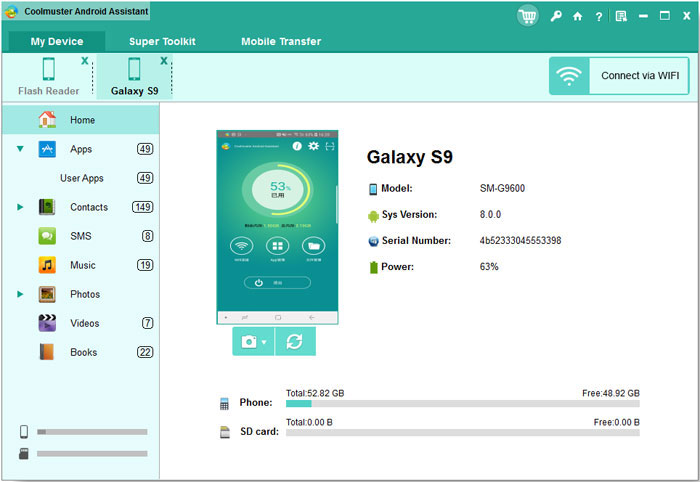
Notice: If this is the first time you connect android phone to the
problem on computer, you should enbale USB debugging first, and install a
USB driver on your computer, then the app would detect your android
phone automatically.
Step 2:Select sms and Start Export
You can find many icon on the left, find "Contacts" and click it, all
then go to "SMS", then all sms on your android phone will be listed on
the right. Then select and check you want to transfer, at last click
"Export" to start the work.
That's all, very easy, right?
A wide range of Android brands are supported by this Android managing
tool, including HTC, Samsung, Motorola, Sony, ZTE, LG, HUAWEI, Dell and
many more.
http://download.cnet.com/Coolmuster-Android-Assistant/3000-18511_4-76035854.html
Post Your Ad Here
Comments (1)
Lucy Ll1
doctor
I know a special designed android data backup app, iPubsoft Android File Manager, just few simple steps to transfer everything from your phone to computer.