Google Virtual Business Card

Google Virtual Business Card
As per Google, the feature allows users to create a virtual visiting card on Search, highlight their website or social profiles and add information about their selves that they would like others to know.
A people card can include a website link, links to social profiles, and any other information you want people to know about you.
The People Cards feature is aimed at helping individuals, influencers, entrepreneurs, prospective employees, self-employed people, freelancers who want to be discovered and help the world find them.
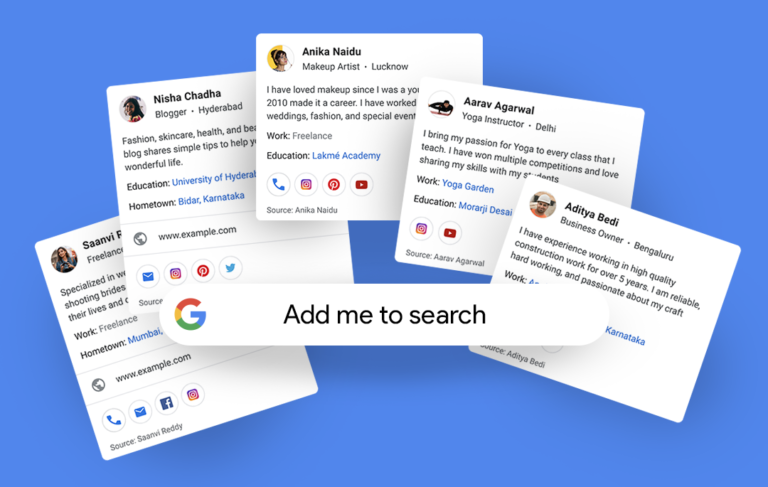
Image: Google
How to create your People Card on Google Search
Step 1: To create a People Card, users will first need to sign in to their Google Account, search for their name on Google Search
Step 2: Tap on the "add me to Search" option that appears on the page
Step 3: Upload an image of yourself from your Google account, add a description and links to social profiles or websites. You can even include your phone number or email address if you want it on your virtual visiting card
Step 4: Tap on the "save" option and that's it
People are not required to display their phone number, but Google does require it for authentication purposes.
Feel free to ask any questions. Simply Hit the Message button.
15 people like it





Advertise on APSense
This advertising space is available.
Post Your Ad Here
Post Your Ad Here
Comments (9)
andrew philips1
blogger
nice article, thanks for sharing these details
Dmytry Frey1
Manager
Nice article! Thx for it!
India Food Network3
Indian Food Recipes
Great information given by you.
Advance Dental5
Advance Dental Clinic
this is very informative article..
Mumbai Live7
Latest News in Mumbai
Great, informative article..
Bhagwati Ayurved7
Doctor
Thanks for sharing this informative article.
Shikha Singh2
i am a blogger
Great information given by you.
andrew philips1
blogger
Really, very informative article
Kim John2
Marketing Manager
Great info and an initiative by Google