Free up space on iphone with iMyfone Space Saver for iOS
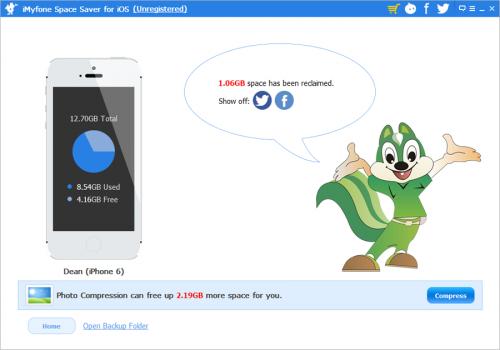 One of the challenges we encounter every day is making the most of the 16GB of space available on our iPhone. In today's world of advanced applications, high-end cameras producing detailed photos and quality video, and console-grade games, it's all too easy for your iPhone to fill up storage very quickly indeed. Even users with massive 64GB storage models can find things get out of hand fast, so it's even worse if you're on the entry-level 16GB.
So, how did we manage to slim down our iPhone in order to manage with just 16GB of space for storing apps, photos, music and more? And how do we keep from filling the phone up to capacity? Thankfully there is a software named iMyfone Space Saver for iOS can free up space on your iPhone easily!
There is no doubt that people can delete some apps if they don’t need them with crying need.This is an obvious place to start.The benefit of deleting a few apps is that you could free up as much as 500MB with very little effort.However,there are some apps that aren't so easy to delete because Apple ships the phone with them pre-installed. What’s more, many people have a crying need for any apps they downloaded. If you hope them to delete their beloved apps,they won’t be reluctant to do. Similarly, deleting videos and books or messages is not desirable for many people.
How to free up space on iPhone? The methods above is so complicated and sundry. Tired of checking every multi-media file and photos to free up iPhone space? You need a one-click solution! iMyfone Space Saver for iOS frees you from manual deletion and backup, and can remove junk files and compress photos to free up a lot of space.
iMyfone Space Saver for iOS can free up iPhone space in two ways:iMyfone Space Saver for iOS is powerful to clean up your iPhone or iPad or iPod system by removing any kinds of junk files.Whenever your iPhone, iPad or iPod Touch is out of space, you can use this program to wipe off junks and speed up your
 iDevice.Another remarkable feature of iMyfone Space Saver for iOS is the lossless photo compression, which can release up to 75% of photos' space for your iOS devices without any deletion. Concerned about ruining your original photos? It will never! Because all photos will be automatically backed up to your computer before compression.
You just need to click and the program will finish the iPhone free up space process in three steps.
Step 1. Connect your iPhone to computer
After downloading and running the program on your computer, you are prompted to connect your iPhone to computer. Once connection is completed, you will see the Home interface with Mr. Squirrel saying hi to you.
Step 2. Scan Junk Files
When you click Mr. Squirrel, the process of scanning your iPhone begins. You will see how much space can be freed up by junk file clean-up and photo lossless compression respectively.
Step 3. Reclaim more space for your iPhone.
With the help of iMyfone Space Saver for iOS, most people have saved a mass of sapce on their iPhone.To save space and money, check out iMyFone Space Saver and find out what it can do for your iPhone.

Comments