Detail steps of GM Tech2 Scanner TIS2000 software dongle installation
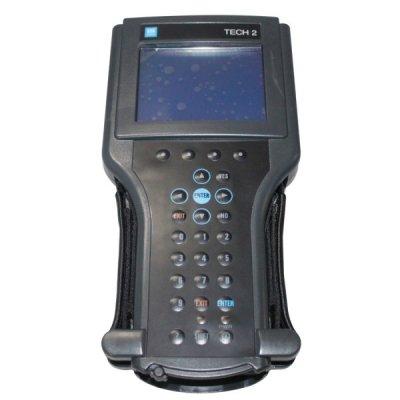
Detail steps of GM Tech2 Scanner TIS2000 software dongle installation
GM
Tech2 Scanner is the diagnose system for GM, Opel, SAAB, Isuzu, Suzuki,
Holden.Vetronix Tech 2 diagnose system can support ECU programming for
GM vehicle models (after 2007) with TIS 2000 software dongle.Obd2repair
share the detail steps of GM Tech2 Scanner TIS 2000 softare installation.
GM Tech2 Scanner Vetronix Tech 2 diagnose GM Tech II

TIS2000 software for GM TECH2
Operating system:
A laptop with COM port running Windows XP operating system
NOTE:
PCs validated to function with all Tech line applications including TIS
Service Programming System (SPS). Other laptops may not support SPS or
communicate properly with the Tech 2 and will not be supported for
hardware communication issues.
Detail steps of GM Tech2 Scanner TIS2000 software dongle installation:
1) Insert TIS2000 software CD into the laptop
2) Install the setup driver in the CD
3) Select Activator. Select first one Activator hardware key
4)
Load DATA DVD (tis2000+data+0802) to run TIS200 on desktop after
compete install the setup. TIS2000 will update the data automatically.
5)
Find out and locate SuperPro.dll file in TIS2000 crackfile folder after
update data and copy the SuperPro.dll file to “C:Program
filescosidsbin”
6) Then run TSI2000 software
7) Connect GM Tech2 device with computer
8) Start ECU programming and follow the windows prompts.
This article is compiled by www OBD2repair com, if you have any advice on it, pls feel free to contact OBD2repair - China OBD2 repair Tool Automotive Diagnostic Tools Car Key Programmer OBD2 ECU chip tuning tool Center.
ADD:1102A,DongMing Business Bldg, Longhua new district, Shenzhen 518113,China
TEL :+86-755-29438109
Email: info@obd2repair.com
Skype: eobdscan1
Website: www.obd2repair.com
Post Your Ad Here
Comments