Best Practices to Follow When Creating a Responsive Web Design
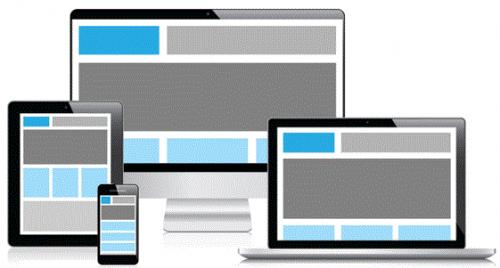
The increasing adoption of mobile devices for accessing the web is making site owners to equip their site with features that help deliver consistent experience to users regardless of the device. However, with new devices getting developed frequently, adjusting it’s practically impossible to create different versions of your site for all the devices. But, a responsive design require a single codebase that can be accessed across several devices. It renders website content and images with precision irrespective of the device used for viewing the site.
There are different methodologies that can be used for creating a responsive site, but beginners can find difficulty in following those methodologies. However, there are a few simple practices that can help you in creating a responsive design successfully even with the conversion of PSD to responsive HTML also:
1. Browsing Experience Must Be Same For All Screen Sizes
When creating a responsive design, make sure that the browsing experience remains same across varied devices. In essence, the visual appeal of your site should not get altered when the website is viewed on different devices screen sizes and resolutions. Put it simply, your desktop users should be provided the same browsing experience like any visitor visiting your site via a Smartphone or tablet.
2. Make Your Design Truly Responsive
Often when designing your website layout, make sure to select layouts that are suitable for responsive design, so as to make your website mobile-friendly. Thankfully, using HTML codes, you can make your design optimized for mobile devices without making the design complex to understand.
3. Compress Files
Make sure to get rid of unwanted characters from your source code, but without making any changes to the functionality that helps optimize your site’s performance. Apart from this method, you can even enable Gzip compression to remove unnecessary bloat from the code, which eventually helps in improving the website load time. Besides minifying your code, combine your CSS as well as JavaScript files into one single file. Doing so, will reduce the number of minimizes HTTP requests.
4. Create Fluid Images
Despite following a RWD approach, you the design might not be actually truly responsive if the images don’t scale to fit the design. However, dealing with images in responsive design can give you a hard time. Here are a few tricks that can help make the images fluid:
Choose creating SVG’s (aka Scalable Vector Graphics) instead of pixel-based images. Use images of high resolution images wherever you can. Use image compression techniques. 5. Remove Irrelevant and Redundant Content
While desktop users want access to plenty of data, mobile users only want to view relevant content. And so, identify the elements and content that you believe is used redundantly for the mobile platform.
Wrapping Up
A responsive design can help make your site easily accessible across diverse devices and platforms. Hope that the above discussed practices will help you come up with a great responsive solution just to convert PSD to HTML responsive design also. But, in case you are still having problem creating such a solution, it is best to take assistance of a professional. Opt for a WordPress developer having knowledge and experience of creating responsive website design.
Post Your Ad Here
Comments