What Are the Best Tools for Wedding Photo Editing?
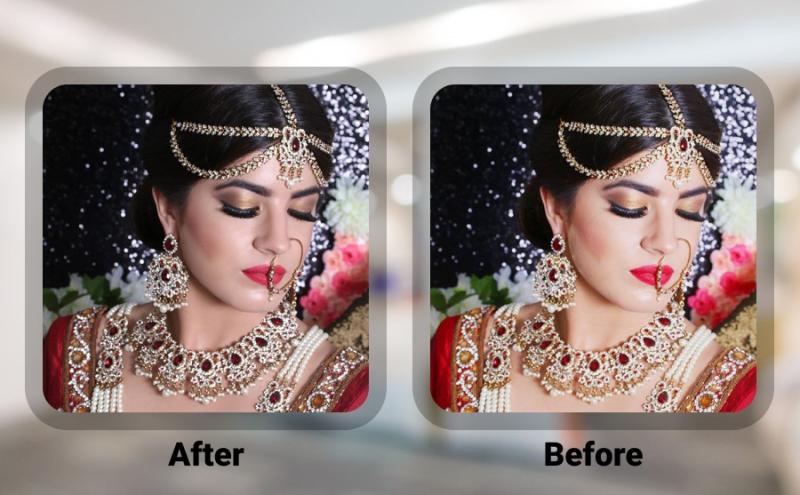
Wedding photography demands more than technical skill behind
the camera—it requires careful refinement after the event to ensure every
emotional moment looks its best. Couples expect luminous colors, flawless skin
tones, and cinematic lighting that preserves the beauty of their special day.
Achieving this level of polish relies heavily on choosing the right editing
software, automation tools, and professional workflows. When photographers
understand which applications work best for weddings, they can produce albums
that feel timeless, consistent, and visually stunning.
For photographers striving to deliver professional
wedding photo editing, investing in powerful software and mastering
modern workflows is essential for success in the competitive USA market.
Why Wedding Photo Editing Services Matter
Handling thousands of images after a wedding can be
overwhelming, especially when deadlines are tight and clients expect
perfection. This is where experienced wedding photo editing services become
invaluable. Such services handle exposure correction, skin retouching,
background cleanup, and stylistic consistency across the entire collection. For
photographers across the USA, outsourcing to reliable partners like Global
Photo Edit allows them to spend more time shooting new projects while
experts manage post-production.
Working with trusted wedding photo editing services
also ensures that every delivered album meets professional standards, helping
photographers protect their brand reputation and maintain satisfied clients.
Core Editing Tools Every Wedding Photographer Needs
Selecting the right tools can dramatically improve quality
and turnaround times. Below are the most widely used and respected applications
in the wedding photography industry.
Adobe Lightroom
Lightroom is a cornerstone of wedding workflows because of
its powerful cataloging and batch-editing features. Photographers can
synchronize edits across hundreds of images, apply presets for consistent
tones, and perform non-destructive adjustments that preserve original RAW
files. Its organizational tools make it easy to sort, flag, and export final
selections quickly.
Adobe Photoshop
For detailed retouching and advanced manipulation, Photoshop
remains unmatched. It excels at removing unwanted objects, perfecting skin
texture, correcting stray hairs, and compositing images when necessary. Wedding
photographers rely on Photoshop for hero shots that demand flawless precision.
Capture One
Capture One offers advanced color grading capabilities and
exceptional control over tonal depth. Many professionals favor it for its
skin-tone tools and ability to create customized color profiles that remain
consistent throughout large wedding albums.
Luminar AI
Luminar AI uses artificial intelligence to automate complex
tasks like sky replacement, portrait enhancement, and lighting corrections.
This tool is ideal for speeding up repetitive edits while still offering
creative flexibility for stylized wedding looks.
ON1 Photo RAW
ON1 Photo RAW combines image management, RAW processing,
layers, and effects into one platform. Its flexibility makes it suitable for
photographers who want both organization and creative editing without switching
between multiple applications.
Affinity Photo
Affinity Photo provides professional-level editing features
at a lower cost than subscription-based software. It supports advanced
retouching, HDR blending, and detailed compositing, making it a solid
alternative for budget-conscious professionals.
Productivity and Workflow Tools
Beyond creative software, efficient wedding editing depends
on tools that protect files and speed up repetitive tasks.
Backup and Storage Systems
Reliable backup systems are essential. External hard drives,
RAID storage, and cloud solutions such as Dropbox or Google Drive ensure images
remain secure throughout the editing process. Data loss can damage reputations,
so redundancy is non-negotiable.
Presets and Automation
Custom presets allow photographers to apply a consistent
look instantly. AI-powered automation tools can analyze lighting and color
patterns across hundreds of photos, dramatically reducing manual labor while
maintaining uniform quality.
Calibration and Hardware
Professional monitors with accurate color calibration are
crucial for producing prints and albums that look consistent across screens and
formats. Hardware calibration devices help maintain color accuracy over time.
How to Choose the Right Editing Tools
With so many options available, photographers should
consider several factors before building their toolkit:
- Volume
of Work – Large weddings require strong batch-processing capabilities.
- Editing
Style – Cinematic, bright, or moody looks may favor different
software.
- Budget
– Subscription versus one-time purchase models matter for long-term
planning.
- Learning
Curve – Some tools require more training than others.
- System
Compatibility – Ensure smooth performance on your hardware.
Advantages of Professional Tools and Expert Support
Combining premium software with experienced partners like Global
Photo Edit offers multiple benefits:
- Faster
Turnaround – Meet tight delivery deadlines.
- Consistent
Albums – Maintain a recognizable brand style.
- Higher
Client Satisfaction – Deliver polished, print-ready results.
- Competitive
Advantage – Stand out in a crowded wedding photography market.
Photographers who adopt advanced tools and optimized
workflows can scale their businesses without sacrificing quality.
Conclusion
Choosing the best tools for wedding photo editing is
critical for photographers who want to deliver beautiful, emotionally rich
albums. From industry-standard software like Lightroom and Photoshop to
AI-powered platforms that accelerate workflows, the right combination of
technology can transform post-production efficiency.
Whether managing editing in-house or partnering with trusted
wedding
photo editing services, collaborating with specialists such as Global
Photo Edit ensures consistency, quality, and client
FAQ About Wedding Photo Editing Tools
Q1: Which software is most commonly used for wedding
editing?
Lightroom and Photoshop are industry standards, while Capture One and Luminar
AI are increasingly popular for their advanced color and automation features.
Q2: Are AI tools reliable for wedding photography?
Yes, AI tools are excellent for speeding up repetitive tasks, but manual
refinement is still important for key portraits and detailed retouching.
Q3: Should photographers outsource editing?
Many professionals do, especially during peak seasons. Working with experts
like Global Photo Edit helps maintain quality while reducing workload.
Q4: What hardware is important for editing weddings?
A powerful computer, calibrated monitor, fast storage drives, and backup
systems are essential for smooth and secure workflows.
satisfaction. By mastering these tools and workflows,
wedding photographers across the USA can create stunning collections that
preserve every unforgettable moment of a couple’s big day.


Comments