5 Ways Product Photography Boosts E-commerce Conversion Rates
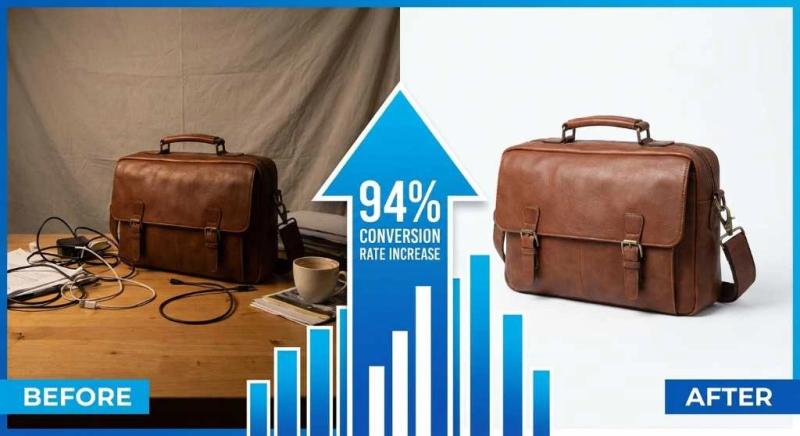
Picture this: You're browsing an online store, ready to buy. You click on a product that catches your eye, but the images are blurry, the background is cluttered with random objects, and you can't quite tell what color the product actually is. What do you do? If you're like most shoppers, you hit the back button and move on to a competitor.
This scenario plays out millions of times every day across e-commerce sites. The harsh reality is that your product photography isn't just about making things look pretty; it's directly impacting your bottom line. Research from Shopify reveals that products with professional-quality photos see a staggering 94% higher conversion rate compared to those with low-quality images. That's not a typo. We're talking about nearly doubling your sales just by improving your product images.
In this guide, we'll walk you through five specific ways product photography impacts your e-commerce conversion rates. Whether you're running a small Etsy shop or managing a large online catalog, these insights will help you understand why investing in quality product photography and specifically, clean images with removed backgrounds, is one of the smartest moves you can make for your business.
1. Clean Product Images with Removed Backgrounds Build Customer Trust
When someone lands on your product page, their brain makes a snap judgment in about 50 milliseconds. That's faster than a blink. In that split second, cluttered or unprofessional images trigger doubt. Customers start questioning: Is this a legitimate business? Will the product actually look like this? Can I trust this seller?
Clean product images with removed backgrounds solve this problem instantly. They communicate professionalism, attention to detail, and reliability. According to research, 67% of online shoppers consider image quality "very important" when making purchase decisions. That means more than two out of three potential customers are evaluating your business based on how your products look online.
The Psychology Behind White Backgrounds
There's actual science behind why clean backgrounds work so well. When you remove distracting elements from product photos, you reduce what psychologists call "cognitive load," the mental effort required to process information. Your customer's brain doesn't have to filter out irrelevant details like messy tables, random props, or inconsistent lighting. Instead, all their attention focuses exactly where you want it: on your product's features, colors, and quality.
This focused attention creates what we call a "premium perception." Even if you're selling affordable products, clean presentation makes them appear more valuable. Think about how Apple photographs its products, or how luxury brands showcase items on their websites. They almost universally use clean, white backgrounds because it works.
Major marketplaces understand this psychology, too. Amazon, for instance, requires main product images to have a pure white background (RGB 255, 255, 255). This isn't arbitrary; it's based on years of conversion data showing that standardized, clean backgrounds increase buyer confidence and reduce returns.
Real-World Impact: Case Study
Let's look at a concrete example. A jewelry retailer we studied was struggling with conversion rates hovering around 1.2%. Their product photos were taken on various surfaces, wood tables, fabric backgrounds, and even some outdoor shots. While artistic, the inconsistency created confusion.
They decided to standardize their entire catalog with clean, white backgrounds. The process took about three weeks, using background removal tools like Instacut Studio to clean up their existing photos without expensive reshoots. The results: Their conversion rate jumped to 1.5% - a 25% increase.
2. Comprehensive Product Views Eliminate Buyer Uncertainty
Online shopping has one fundamental challenge: customers can't touch, feel, or examine products in person. This creates what researchers call the "sensory gap," the disconnect between browsing online and shopping in a physical store. Your product photography needs to bridge this gap, and the best way to do that is by showing your products from multiple angles with detailed shots.
Statistics back this up powerfully. A study found that 93% of consumers consider visual appearance the most crucial factor in their purchasing decisions. Not price. Not reviews. Visual appearance. When you provide comprehensive views of your products, you're giving customers the confidence they need to click "add to cart."
Beyond Basic Shots: What Customers Actually Want to See
Most sellers stop at one or two product images. That's a mistake. Here's what customers actually want to see before they buy:
Front, back, and side views give a complete picture of the product's shape and design. A handbag might look gorgeous from the front, but customers need to see the back panel, side profile, and bottom to understand its actual dimensions and construction.
Texture close-ups answer questions that text descriptions can't. Is that fabric smooth or textured? Does the leather have a grain? Are there visible stitches? A close-up shot showing material texture can be the difference between a sale and an abandoned cart.
Size comparisons help customers understand scale. A photo of your product next to a common object (a coin, a hand, a standard water bottle) provides instant context. This is especially critical for items where size perception varies, such as jewelry, home decor, and tech accessories.
Functional details show how the product works. If it has pockets, show them open. If it has adjustable straps, show the adjustment mechanism. If it comes with accessories, show them in use. These details answer the "how does it work?" questions before customers even ask.
Mobile Shopping Considerations
Here's a stat that might surprise you: over 70% of e-commerce traffic now comes from mobile devices. That means most of your customers are viewing your products on screens that are 6 inches or smaller. This changes everything about how you should approach product photography.
Images need to be crystal clear even when viewed on a small screen. Details that are obvious on a desktop monitor can disappear on a phone. This is why high-resolution images with zoom functionality are no longer optional; they're essential. When customers can pinch to zoom and see fabric weave or product texture, their confidence in the purchase increases dramatically.
3. Professional Photography Elevates Brand Perception
Your product images don't just show what you're selling, they communicate who you are as a brand. Professional, consistent photography signals that you're a serious business that cares about quality. Inconsistent, amateur-looking photos suggest the opposite, even if your products are excellent.
The numbers tell a compelling story. Shopify's research found that products with professional photos see a 33% higher conversion rate compared to those with DIY snapshots. That's a significant gap that directly impacts your revenue.
The Consistency Factor
Walk into any successful retail store, and you'll notice everything looks cohesive. The lighting is consistent, the displays are uniform, and the overall aesthetic is carefully curated. Your online store needs the same level of consistency, and it starts with your product photography.
Consistency means several things. First, lighting should be uniform across all your product images. When some photos are bright and others are dim, or when color temperatures vary wildly, it creates a disjointed shopping experience. Customers might even wonder if they're looking at the same brand.
Background consistency is equally important. If half your products are photographed on white backgrounds and the other half on random surfaces, your catalog looks unprofessional. This is where background removal becomes a game-changer. You can take products photographed in different settings and standardize them all with clean, white backgrounds, creating instant visual cohesion.
Standardized sizing and cropping matter too. When customers browse your category pages, products should be framed similarly. If one product image shows the item taking up 80% of the frame while another shows it at 40%, the browsing experience feels chaotic. Professional catalogs maintain consistent product sizing across all images.
4. High-Quality Images Set Realistic Expectations and Reduce Returns
Here's a painful truth for e-commerce sellers: returns are expensive. Really expensive. Between shipping costs, restocking fees, and the time spent processing returns, each returned item can cost you 20-30% of its sale price. Even worse, 26% of shoppers abandon their carts specifically because of poor or missing product images. You're losing sales before they even happen.
The connection between image quality and return rates is direct and measurable. When customers can clearly see what they're buying, accurate colors, true-to-life textures, realistic sizing, they're far less likely to be disappointed when the package arrives. Disappointment drives returns.
The True Cost of Poor Product Photography
Let's break down what poor product photography actually costs your business beyond just lost sales.
- Return processing costs add up quickly. Each return requires customer service time, shipping label generation, warehouse processing, quality inspection, and restocking. For many businesses, this costs $10-$20 per return, regardless of the product's value.
- Customer lifetime value impact is even more significant. A customer who returns a product due to inaccurate images is unlikely to shop with you again. They've lost trust. If your average customer lifetime value is $500, losing that customer over a $50 product return means you've actually lost $500 in future revenue.
- Negative reviews from unmet expectations damage your reputation. When customers write reviews saying "doesn't look like the picture" or "color was completely different," it affects future conversion rates. Potential customers read those reviews and decide to shop elsewhere.
- Shipping and restocking expenses hit your margins hard. If you offer free returns (increasingly expected by customers), you're paying for shipping both ways. For a $50 product with $8 shipping each way, that's $16 in shipping costs alone, plus your other processing expenses.
A mid-sized apparel brand we studied was experiencing a 22% return rate. When they analyzed return reasons, "doesn't match photos" and "color not as expected" accounted for nearly 40% of all returns. They invested in better photography with accurate color representation and detailed texture shots. Within three months, their return rate dropped to 18.7% - a 15% reduction. For a business processing 1,000 orders monthly, that meant 33 fewer returns each month, saving approximately $6,600 monthly in return-related costs.
Accuracy Best Practices
Achieving accurate product representation isn't complicated, but it does require attention to specific details.
- True-to-life color representation is critical. This means photographing in proper lighting (ideally natural daylight or daylight-balanced artificial lighting) and avoiding heavy filters or editing that distorts colors. If your product comes in multiple colors, photograph each variant separately. Don't just digitally change the color of one photo; customers can tell, and they'll be disappointed when the real product arrives.
- Scale indicators help customers understand size. Include a common reference object in at least one photo, or use a model to show scale for wearable items. For smaller products, a simple ruler or coin in the frame provides instant context. For furniture or larger items, show them in a room setting so customers can gauge dimensions.
- Material texture visibility requires close-up shots with good lighting. If you're selling a leather bag, customers should be able to see the grain of the leather. If it's a knit sweater, they should see the weave pattern. These details set accurate expectations about quality and feel.
- Multiple lighting conditions can be helpful for certain products. A dress might look different in natural daylight versus indoor lighting. Showing both helps customers understand how the product will look in their real-world environment.
The investment in accurate photography pays dividends not just in reduced returns but in increased customer satisfaction and repeat purchases. When customers receive exactly what they expected based on your photos, they trust your brand and come back for more.
5. Contextual Product Photography Increases Purchase Intent
There's a reason lifestyle magazines are so effective at selling products. They don't just show you an item, they show you a lifestyle, an aspiration, a story. The same principle applies to e-commerce product photography. While clean, white-background images are essential for building trust and meeting marketplace requirements, lifestyle photography creates emotional connections that drive purchase intent.
The psychology here is straightforward: customers don't just buy products, they buy solutions to problems and improvements to their lives. Lifestyle photography helps them visualize how your product fits into their world.
When to Use Lifestyle Photography
Not every product needs lifestyle shots, and not every platform is ideal for them. Here's how to think strategically about when and where to use contextual photography.
- Product categories that benefit most include fashion and apparel (show clothing on models in real settings), home decor (show items in styled rooms), outdoor gear (show products in use during activities), beauty products (show application and results), and tech accessories (show devices in use scenarios).
- Balancing clean shots with contextual images is key. Your main product image should almost always be a clean, white-background shot; this is what performs best in search results and category pages. But your secondary images can and should include lifestyle shots that provide context and create emotional appeal.
- Platform-specific strategies matter. On your product pages, lead with clean shots and include lifestyle images as secondary photos. On Instagram and Pinterest, lifestyle photography performs significantly better because these platforms are about inspiration and aspiration. On Amazon and other marketplaces, follow their guidelines (usually requiring white backgrounds for main images), but use lifestyle shots in your secondary image slots.
Creating Effective Lifestyle Shots
The difference between effective lifestyle photography and amateur attempts often comes down to authenticity and relevance.
- Authentic settings vs. staged is a delicate balance. Your lifestyle shots should feel real and relatable, not like a sterile photoshoot. If you're selling kitchen products, show them in an actual kitchen that looks lived-in, not a pristine showroom. Customers connect with images that reflect their own lives.
- Model diversity and representation matter more than ever. Customers want to see themselves in your photos. This means showing your products on different body types, ages, ethnicities, and in various real-life scenarios. Inclusive representation isn't just good ethics, it's good business. Customers are more likely to buy when they can visualize themselves using your product.
- Storytelling through imagery elevates lifestyle photography from simple product placement to compelling narrative. Instead of just showing someone wearing your jacket, show them on a hike, laughing with friends, or walking through a city. The product becomes part of a story that customers want to be part of.
- Seasonal and trend considerations keep your imagery fresh and relevant. Update lifestyle photos to reflect current seasons, trending styles, or timely use cases. A photo of someone using your product during summer activities will resonate differently in December than in July.
Taking Action: Your Next Steps
We've covered a lot of ground, so let's distill this into actionable steps you can take right now to improve your product photography and boost your conversion rates.
First, audit your current product images. Look at your top 20 products and honestly assess the image quality. Are backgrounds clean and consistent? Do you have multiple angles? Can customers see texture and details? Are colors accurate? This audit will show you where your biggest opportunities lie.
Second, prioritize your improvements. You probably can't reshoot your entire catalog overnight, and you don't need to. Start with your best-selling products or highest-margin items. Improving images for products that already get traffic will show results fastest.
Third, standardize your backgrounds. This is often the quickest win. Use background removal tools to create clean, white backgrounds across your catalog. This single change can improve conversion rates by 20-30% based on the case studies we've examined.
Fourth, add more angles and details. For your priority products, ensure you have at least 5-7 images: main shot, multiple angles, close-ups of key features, size comparison, and at least one lifestyle shot if relevant to your product category.
Fifth, optimize for performance. Compress your images, implement lazy loading, and ensure your site loads quickly on mobile devices. Fast-loading, high-quality images give you the best of both worlds.
Frequently Asked Questions
What's the ideal background color for product photos?
White (specifically RGB 255, 255, 255) is the gold standard for e-commerce product photography. It's required by major marketplaces like Amazon, provides maximum versatility for using images across different platforms, and creates the clean, professional look that builds customer trust. White backgrounds also make it easier to see product colors accurately and create visual consistency across your catalog.
How many product images should I include per listing?
Aim for a minimum of 5-7 images per product. This should include: a main product shot on a white background, multiple angle views (front, back, sides), close-up detail shots showing texture and features, a size comparison or scale reference, and at least one lifestyle or contextual image showing the product in use. More complex products may benefit from additional images showing specific features or use cases.
Do I need professional photography equipment to get good results?
Not necessarily. Modern smartphone cameras (especially iPhone 12 and newer, or equivalent Android devices) can produce excellent product photos when combined with proper lighting and technique. The key factors are good lighting (natural window light or affordable LED panels), a stable surface or tripod, and post-processing tools like background removal. That said, if you're selling high-end products or have a large catalog, investing in a mid-range DSLR or mirrorless camera ($500-$1,000) can provide more control and consistency.

Comments