Step-by-Step Guide to Accept Payments With a Card Reader
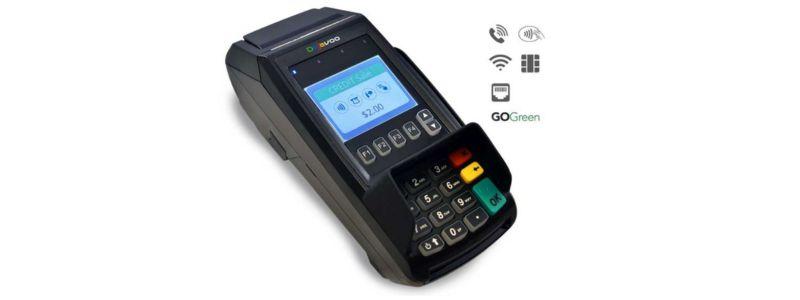
In today’s world, customers expect fast and convenient payment options wherever they shop. Whether you run a small store, a café, or provide mobile services, being able to accept card payments is essential. Accepting card payments not only makes it easier for your customers to pay but also helps your business look professional and reliable. With a portable card reader, you can handle payments anywhere, from your shop counter to outdoor events or markets.
Using a card reader for your business simplifies the payment process. It reduces cash handling, minimizes errors, and speeds up checkout times. Additionally, it allows your business to cater to customers who prefer using cards or digital wallets. This guide will walk you through each step of setting up and using a card reader, so you can start accepting payments smoothly and securely.
Understanding the Card Reader
A card reader is a small device that connects to your smartphone or tablet, enabling you to accept debit and credit card payments. Most modern readers support multiple payment options, including chip cards, contactless payments like mobile wallets, and magnetic stripe cards. The device works by securely transmitting payment information to the bank for authorization, ensuring safe and reliable transactions.
Knowing the device’s capabilities is important before you start using it. It not only allows you to serve your customers efficiently but also helps you troubleshoot any issues that may arise during payments. This understanding ensures a smooth experience for both you and your customers.
Setting Up Your Account
Before using the card reader, you need to set up an account. This involves downloading the app that works with your device and entering your business information, such as your name, address, and bank account details. Once your account is verified, you can link your card reader and begin processing payments. This verification step ensures that all transactions are safe and that your money will be deposited directly into your account without any delays.
Account setup may seem like a small step, but it’s crucial for keeping your business finances organized. A properly set up account makes tracking transactions, issuing refunds, and managing your sales reports much easier.
Pairing Your Card Reader
Once your account is ready, the next step is pairing your card reader with your smartphone or tablet. Turn on your device and enable Bluetooth on your mobile device. Open the app and follow the instructions to connect the reader. Most apps automatically detect nearby devices, making the pairing process quick and simple.
A stable connection is essential for smooth operation, especially if you have multiple devices in a busy environment. After pairing, your card reader is ready to process payments efficiently.
Accepting Payments
To accept a payment, open the app and enter the amount your customer needs to pay. You can also add a description of the product or service for better record-keeping. The customer can then choose their preferred payment method, whether it’s a chip card, contactless payment, or magnetic stripe.
The card reader communicates with the bank to authorize the transaction. This usually takes only a few seconds. Once approved, the payment is complete. Fast and smooth transactions create a positive experience for your customers and help your business appear professional.
Ensuring Security
Security is a top priority when accepting payments. Modern card readers encrypt payment information to protect both your business and your customers. The app and device follow international security standards, keeping transactions safe from fraud.
Knowing that your payments are secure builds trust with customers. People are more likely to return to a business where they feel their financial information is protected.
Providing Receipts
After a successful transaction, you can provide your customer with a receipt. Most card readers allow you to print a receipt, send it by email, or even deliver it via SMS. Digital receipts are particularly convenient for mobile businesses and help reduce paper waste.
Additionally, all transaction details are stored in the app. This makes it easy to manage your finances, track sales, and handle taxes. Keeping organized records is essential for any business looking to grow and stay compliant.
Additional Features
Card readers offer more than just payments. You can issue refunds quickly if needed, and some apps let you manage multiple devices or users from a single account. These features are especially helpful if you have several points of sale or staff handling payments.
If you’re interested in a portable solution, you can check out this sumup card reader for more information on features and pricing.
Benefits for Mobile Businesses
For businesses on the move, a portable card reader is a game-changer. Small, lightweight, and battery-operated, it allows you to accept payments anywhere without needing a fixed counter. This flexibility helps you capture more sales opportunities and expand your customer base.
The long battery life ensures you can process multiple transactions throughout the day without interruptions. Whether you run a food truck, a pop-up shop, or attend market events, a portable card reader keeps your business ready to accept payments at all times.
Tracking Business Performance
Most card reader apps also offer reporting tools. You can see your sales history, track popular products, and analyze customer behavior. These insights help you make informed decisions about your business, such as adjusting your inventory or planning promotions.
Using the payment data strategically can turn simple transactions into valuable business insights. It’s an easy way to improve efficiency, identify trends, and boost profitability.
Tips for Smooth Operation
To keep your card reader working effectively, it’s important to update the app regularly. Ensure your device is charged and store it safely when not in use. If you have staff handling payments, train them on how to use the device properly.
A well-prepared team and a reliable payment system create a smooth checkout experience, making customers more likely to return. Small efforts in maintaining your device can have a big impact on customer satisfaction and business success.
Conclusion
Accepting payments with a card reader is simple, efficient, and essential for modern businesses. By following the steps outlined in this guide—from setting up your account and pairing the device to processing payments securely and providing receipts—you can create a seamless experience for your customers.
A portable card reader provides mobility, security, and convenience, allowing businesses to operate professionally in any environment. With additional features like refunds, multiple users, and sales tracking, it is more than just a payment device—it is a complete solution to support your business growth. By adopting this technology, you make transactions easier, enhance customer satisfaction, and give your business a professional edge.
Post Your Ad Here
Comments