A Beginners Guide to Mastering Electronic Cutting Machines
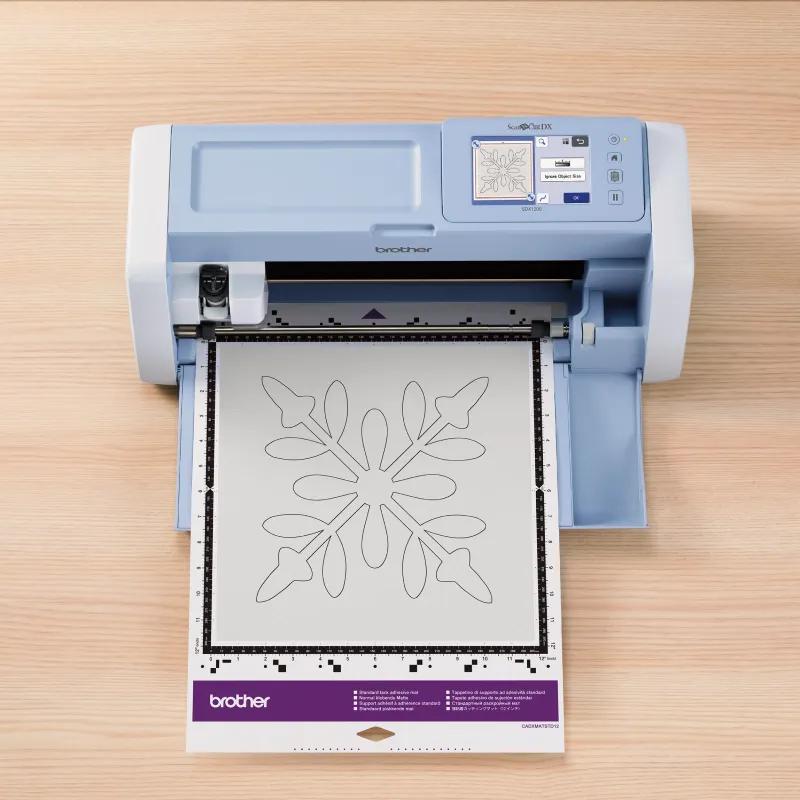
From First Cut to Clean Finish: Simple techniques that help new makers avoid mistakes and create with confidence
Electronic ScanNCut machines have opened the door to creativity for thousands of first time makers across the GCC. From custom vinyl decals and paper crafts to fabric accents and foam projects, these tools allow beginners to achieve professional looking results at home. Yet many new users quickly discover that owning a cutting machine is only half the journey. Knowing how to prepare designs, set materials correctly, and avoid common pitfalls makes all the difference between frustration and creative flow.
This guide breaks down essential tips that help beginners get the most out of modern electronic cutters. By understanding how today’s machines are designed to support accuracy, flexibility, and ease of use, new crafters can build confidence and develop skills that grow over time.
Start with smart design preparation
One of the biggest mistakes beginners make is rushing into cutting without properly preparing their designs. Modern electronic cutters often include built in scanning technology that allows hand drawn images, printed artwork, or photos to be converted directly into cut files. Learning how to scan cleanly and edit outlines before cutting saves time and material.
High resolution scanning allows sharper edges and more accurate shapes. A 600 dpi scanner, for example, captures fine details that are often lost when working with lower quality scans. Beginners should start with bold designs and gradually move toward more intricate patterns as confidence grows.
Design preparation is a foundational skill in beginner craft cutter projects and mastering it early leads to smoother results.
Understanding cutting mats and why they matter
The cutting mat is just as important as the blade itself. Different materials require different mat strengths to hold them in place during cutting. Using the wrong mat often causes shifting, tearing, or incomplete cuts.
Light grip mats work best for paper and vinyl, while stronger adhesive mats are suited for fabric, foam, or thicker craft materials. Beginners should always test placement and ensure the material lies flat before cutting begins.
Choosing the correct mat improves alignment, protects materials, and extends blade life. It is a simple habit that prevents many early frustrations.
Material thickness and blade settings made simple
Blade settings are one of the most intimidating aspects for beginners, yet modern machines are designed to remove much of this guesswork. Advanced electronic cutters often include automatic blade adjustment that detects material thickness and applies the correct pressure.
For beginners, this feature helps eliminate common errors such as cutting too deeply or failing to cut through fully. Machines capable of handling thicker materials up to several millimeters also allow users to explore foam, felt, and layered projects without changing tools.
Understanding how material thickness impacts blade pressure is a key step in mastering electronic cutter tips and building consistent results.
Avoiding common beginner mistakes
Even with the right tools, small errors can lead to disappointing outcomes. One frequent issue is misalignment, especially when working with scanned designs. Ensuring the material is loaded straight and aligned with guide markings prevents skewed cuts.
Another mistake is using the wrong cut speed. Slower speeds generally produce cleaner edges, especially on detailed designs. Beginners should resist the urge to rush and instead prioritize precision.
Incorrect blade selection can also affect outcomes. Many modern machines use versatile auto blades that adjust automatically, which reduces the chance of damage and improves accuracy across materials.
Working safely and efficiently with vinyl
Vinyl remains one of the most popular materials for beginners due to its versatility and clean finish. However, cutting vinyl incorrectly can lead to tearing or wasted material.
Always place vinyl shiny side down on the mat and use a test cut before committing to a full design. Weed excess material slowly to avoid lifting delicate details. These habits are essential for anyone learning how to cut vinyl safely and efficiently.
Modern cutters designed for vinyl often include intuitive settings that simplify this process, making it easier for beginners to succeed from the start.
Why modern cutters support beginner growth
The latest generation of electronic cutting machines is designed with beginners in mind. Features such as touchscreens, built in design editing, scanning functionality, and automatic blade systems reduce technical barriers and encourage experimentation.
Exploring the full range of electronic cutting machines available today shows how far these tools have evolved. Many now allow users to design directly on the machine, scan original artwork, and cut a wide variety of materials without additional software.
Advanced platforms within this category, including smart cutting machines with scanning and auto blade capabilities, reflect what beginners increasingly look for when choosing a long term creative tool.
Building confidence through practice and exploration
Confidence with electronic cutters grows through hands on use. Beginners should start with small projects like labels, decals, or greeting cards before moving on to layered designs or mixed materials.
Keeping notes on settings that work well helps build personal reference guides. Over time, users begin to understand how different materials behave and how to adjust designs accordingly.
This learning curve is part of the creative journey and modern machines are designed to support it rather than complicate it.
Learning the craft behind the cut
Electronic cutting machines have transformed home crafting across the GCC, making it possible for beginners to achieve professional results with the right guidance and tools. Mastering design preparation, mat selection, material thickness, and blade settings creates a strong foundation for creative growth.
Today’s cutters are built to reduce technical barriers and encourage experimentation, helping new makers move from their first cut to polished finishes with confidence. By understanding how modern features support accuracy and flexibility, beginners can focus less on troubleshooting and more on creativity.
As interest in personalized crafts and home based creative projects continues to grow across the region, learning how to use electronic cutters effectively becomes an invaluable skill. With patience, practice, and the right machine features, every beginner has the opportunity to turn ideas into beautifully finished creations.
Post Your Ad Here
Comments