Block Diagram of Computer System
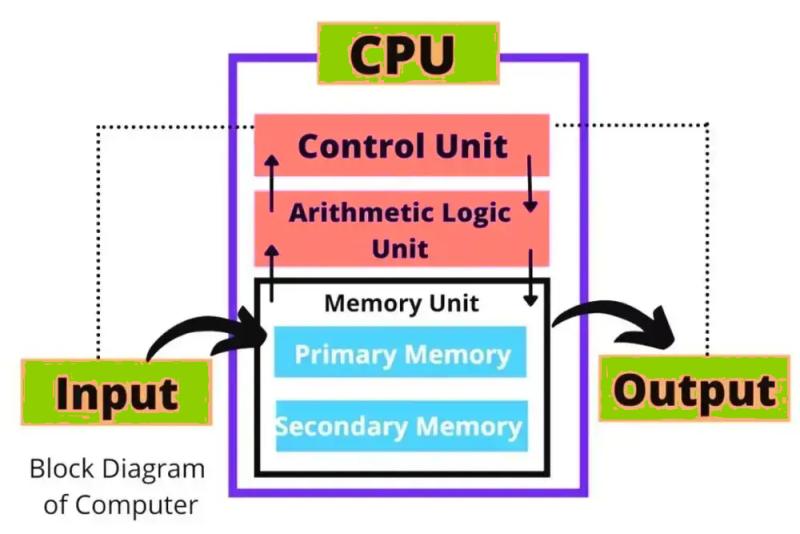
A computer system's block diagram provides a visual snapshot of its structural structure, offering a simplified yet practical depiction of how a computer operates. From entering data to finalizing results, this diagram outlines the internal workings of a computer in an easily understandable way.
Understanding this diagram isn't just for technology enthusiasts—it's essential for anyone interested in computer science or exploring technology. It acts as a roadmap, guiding you through the interconnected roles of hardware and software components, and showing how they seamlessly collaborate to produce processes and outputs. By deeply understanding the structure and flow depicted in a block diagram, you can deepen your knowledge of computer functionality and discover ways to increase its efficiency.
In the following sections, we'll analyze the computer block diagram in detail, covering all its components step-by-step to ensure that even the smallest aspects are completely clear. Let's get started!
Understanding the building blocks of computer systems is key to understanding the operation of these powerful machines. The main components can be divided into the following essential categories:
1. Input Unit
This is where everything begins. The input unit acts as a gateway for sending data and instructions into the computer. Devices such as the keyboard, mouse, scanner, and microphone facilitate this process, allowing users to effectively interact with the system.
2. Output Unit
Equally important, the output unit translates the processed data into a human-readable or usable format. Monitors, printers, and speakers are commonly used output devices that help present results or perform actions based on the computer's processing.
3. Central Processing Unit (CPU)
Often considered the brain of the computer, the CPU executes instructions and handles complex calculations. It can be further divided into three important subcomponents:
(i) Control Unit (CU): The CU oversees and regulates operations within the computer. It directs data flow between the input, memory, and output units and ensures that instructions are executed in the correct order.
(ii) Arithmetic and Logic Unit (ALU): This is where all the math and logic work. From basic arithmetic calculations to handling decision-making tasks using logical operations, the ALU is at the heart of data manipulation.
(iii) Memory Unit: The memory unit acts as a storage center during processing. It is classified into the following categories:
- Primary Memory: Also called main memory, it includes RAM and ROM, which provide fast access to data needed by the CPU for ongoing processes.
- Secondary Memory: This refers to long-term storage solutions, such as hard drives, SSDs, or optical disks, used to retain data beyond immediate computational needs.
All of these components together form a coherent system that enables modern computers to perform various tasks efficiently and effectively. Each part plays an essential role and works harmoniously to ensure smooth operation.
Thus, the block diagram of a computer system shows you the structural representation of a computer.
Post Your Ad Here