Magento 2.4.8 Upgrade: 10 Common Mistakes I Avoided (And You Should Too)
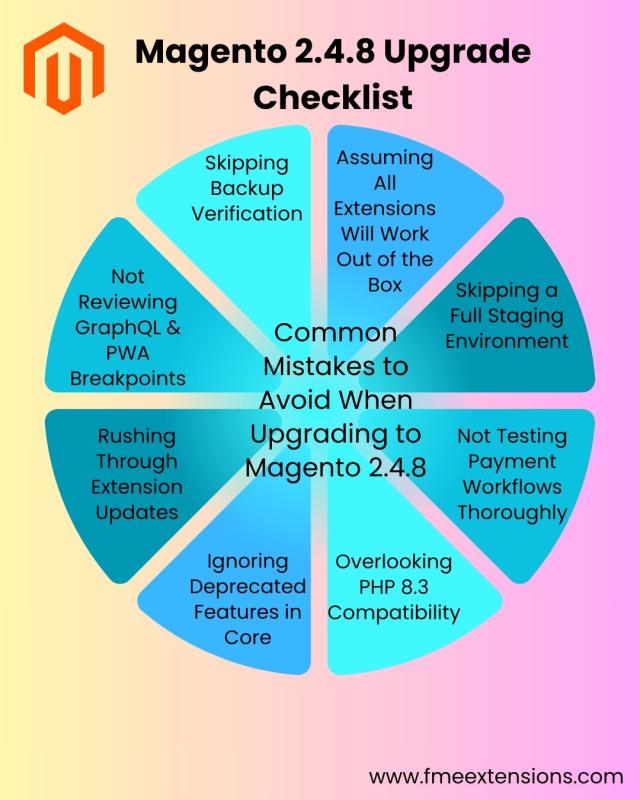
Upgrading a Magento store isn’t just clicking a button. It’s a high-stakes move, one that can either improve performance and security, or break key store functions if rushed.
I recently upgraded my store from Magento 2.4.7 to 2.4.8, and while the outcome was positive, there were several moments that could’ve gone very wrong. That’s why I’m sharing this list, to help fellow Magento store owners, developers, and freelancers avoid the most common upgrade mistakes.
Whether you’re preparing to upgrade soon or planning one later in 2025, these 10 tips can save you time, frustration, and revenue loss.
1. Assuming All Extensions Are Compatible
Not all Magento extensions are immediately compatible with new releases. I had a payment module break because it wasn’t yet updated for PHP 8.3.
What to do:
Check for Magento 2.4.8 compatibility tags from your extension vendors. Sites like FMEextensions.com clearly label supported versions.
2. Skipping Staging Environment Testing
Testing on localhost is not enough. A full staging environment mimicking your production setup is essential.
What to do:
Clone your live store into staging, including theme, DB, CDN, and third-party services.
3. Ignoring Payment Method Edge Cases
Your checkout might look fine... until a customer tries Apple Pay or applies a gift card. I nearly missed a Braintree bug that only triggered on mobile.
What to do:
Test multiple flows: wallets, saved cards, coupons, guest checkout, etc.
4. Overlooking PHP 8.3 Compatibility
Magento 2.4.8 supports PHP 8.3, but some legacy extensions and custom scripts don’t.
What to do:
Check your hosting PHP version and test your store on PHP 8.3 before switching.
5. Not Reviewing Deprecated Features
Magento quietly removes or replaces things. For example, jQuery’s file uploader was swapped out for Uppy.
What to do:
Scan release notes and check for replaced libraries that may affect custom features.
6. Updating Extensions After the Upgrade
Delaying your extension updates can cause breakage during upgrade deployment.
What to do:
Update all your key extensions to their latest versions before you upgrade core Magento.
7. Forgetting About GraphQL & PWA Issues
If you use headless setups or PWA Studio, 2.4.8’s GraphQL changes may affect caching and attribute handling.
What to do:
Clear all caches, test GraphQL queries, and verify navigation filters work properly.
8. Incomplete Checkout Testing
It’s easy to test basic checkout. But real users throw curveballs, multiple currencies, expired vouchers, edge browser issues.
What to do:
Simulate complex orders before going live.
9. Not Verifying Your Backup
Backups don’t help if they’re incomplete or corrupted.
What to do:
Do a test restore from backup before starting the upgrade.
10. No Rollback Plan
If something goes wrong during the upgrade, what’s your Plan B?
What to do:
Write a rollback procedure in advance. Keep your backup commands and restore instructions ready.
Final Word: Plan Smart, Upgrade Smooth
Magento 2.4.8 is a stable, smart upgrade — but only when done right. The platform offers:
-
✅ PHP 8.3 support
-
✅ GraphQL improvements
-
✅ Enhanced security
-
✅ Smoother admin experience
-
✅ Better performance with media, logs, and styling
But don’t jump in blind. These 10 lessons helped me upgrade without major downtime or user complaints — and they can help you too.
? Need Magento 2.4.8-compatible extensions?
I used tools from FMEextensions.com — including shipping restrictions, refund requests, and partial payments — with zero post-upgrade conflicts.
? Bookmark this checklist and share it with your dev team or clients planning to upgrade Magento soon!
Post Your Ad Here
Comments