Load Cell Indicators
Introduction
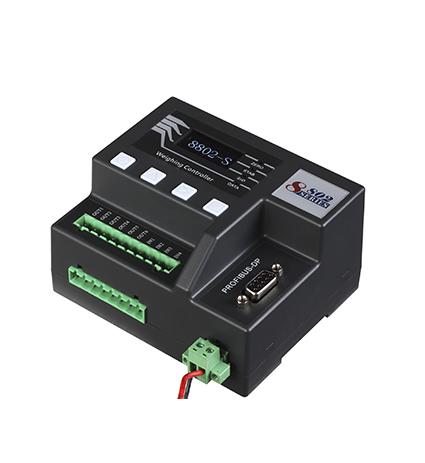
Load cell indicators and weighing scale indicators are critical components in modern weighing systems. They convert electrical signals from load cells into readable weight measurements, ensuring accuracy in industries like manufacturing, logistics, agriculture, and healthcare.
This guide explores the functions, types, applications, and key features of load cell indicators and weighing scale indicators, helping you choose the right one for your needs.
What Are Load Cell Indicators?
A load cell indicator (also called a weight indicator or digital weight display) is an electronic device that processes signals from load cells and displays the measured weight.
How Do Load Cell Indicators Work?
Signal Reception – The load cell detects force and sends a millivolt (mV) signal.
Signal Amplification – The indicator amplifies the weak signal for processing.
Analog-to-Digital Conversion (ADC) – Converts the analog signal into a digital value.
Display & Output – Shows the weight on a screen and can transmit data to other systems.
Key Features of Load Cell Indicators
✔ High Accuracy – Precision measurement with minimal error.
✔ Multiple Units – Switch between kg, lb, g, oz, etc.
✔ Tare Function – Deduct container weight for net measurements.
✔ Data Logging – Store weight records for analysis.
✔ Connectivity – USB, RS232, Bluetooth, or Wi-Fi for data transfer.
What Are Weighing Scale Indicators?
A weighing scale indicator is a specialized display unit used in commercial and industrial scales. It interprets signals from strain gauges or load cells and provides weight readings.
Types of Weighing Scale Indicators
Basic Digital Indicators – Simple displays for standard scales.
Advanced Indicators – Include counting, checkweighing, and dynamic weighing.
Hazardous Area Indicators – Explosion-proof for chemical/oil industries.
Portable Indicators – Battery-operated for fieldwork.
Applications of Weighing Indicators
Retail & Commercial – Supermarkets, jewelry stores.
Industrial – Tank weighing, conveyor belts.
Logistics – Freight and shipping weight verification.
Food & Pharma – Batch processing, quality control.
Load Cell Indicators vs. Weighing Scale Indicators
While both devices serve similar purposes, there are differences:
| Feature | Load Cell Indicator | Weighing Scale Indicator |
|---|---|---|
| Primary Use | Industrial force measurement | Commercial/retail weighing |
| Display Options | Often larger, rugged | Compact, user-friendly |
| Advanced Functions | Data logging, remote monitoring | Checkweighing, piece counting |
| Compatibility | Works with multiple load cells | Typically paired with a specific scale |
How to Choose the Right Indicator
1. Determine Your Weighing Needs
Do you need basic weighing or advanced features like counting?
Will it be used in harsh environments?
2. Check Compatibility
Ensure the indicator matches your load cell’s output (mV/V, digital).
3. Consider Connectivity
Do you need Bluetooth, Wi-Fi, or cloud integration?
4. Evaluate Durability
IP ratings (e.g., IP65 for dust/water resistance).
Stainless steel housing for corrosive environments.
5. Budget & Brand Reliability
Brands like Mettler Toledo, Rice Lake, Avery Weigh-Tronix offer high-quality indicators.
Common Issues & Troubleshooting
Problem: Inaccurate Readings
Solution: Recalibrate the indicator or check load cell alignment.
Problem: Display Not Working
Solution: Verify power supply and connections.
Problem: Signal Interference
Solution: Use shielded cables and proper grounding.
Future Trends in Weight Indicators
IoT Integration – Real-time data tracking via cloud.
AI-Based Calibration – Automatic adjustments for accuracy.
Touchscreen Displays – More intuitive user interfaces.
Conclusion
Load cell indicators and weighing scale indicators are essential for precise weight measurement across industries. Choosing the right one depends on accuracy needs, environment, and connectivity requirements.
Post Your Ad Here
Comments