Avoid These HubSpot Lead Matching Pitfalls with This Automation Blueprint
In an ideal world, every lead captured in HubSpot would magically connect to the right account, giving your sales team crystal-clear visibility and context. But let’s face it, lead to account matching in HubSpot can feel more like a game of chance than a streamlined process.
For companies with growing contact volumes, manual lead routing or poor automation often results in leads floating around unassigned, mismatched or completely lost in the CRM void. That’s where the right automation blueprint can change everything.
In this post, we’ll uncover the common pitfalls businesses face with HubSpot lead-to-account matching and show you a smarter, scalable way to handle it using automated processes. Whether you're already struggling with bad matches or planning to tighten up your lead routing workflow, this guide will help you dodge the usual traps.
Why Lead Matching in HubSpot Deserves More Attention
HubSpot is a powerful CRM. But when it comes to lead-to-account matching, the native capabilities often fall short for complex B2B sales cycles. Unlike one-touch B2C sales, B2B deals typically involve multiple stakeholders, longer buying journeys and overlapping domains. This makes L2A matching in HubSpot an essential strategy, not just a nice-to-have.
Without accurate lead-to-account association, your team risks:
Reaching out to the same company multiple times through different reps
Losing context on key accounts and contacts
Creating a disjointed customer experience
Slowing down sales velocity due to unnecessary research
That’s why automating this process isn’t just about efficiency, it’s about enabling better revenue outcomes.
Pitfall #1: Relying on Manual Matching
If your team is still manually assigning leads to accounts, you already know the limitations. Manual matching might work when you're handling 10 or 20 leads per day, but it quickly breaks down at scale.
Sales and marketing teams often spend hours combing through contact properties, cross-referencing company names, domains or LinkedIn profiles. The bigger issue is human error. A single misspelling or inconsistent naming format can throw everything off.
To avoid this, you need HubSpot lead to account matching automation that intelligently maps leads to the right accounts using logic and rules, not guesswork.
Pitfall #2: Incomplete or Inaccurate Data
HubSpot’s lead matching tool depends heavily on the quality of your data. If your contact or company records are incomplete — missing domains, inconsistent naming conventions or lack of identifiers the CRM will struggle to draw connections.
One of the most overlooked issues in automated lead matching in HubSpot is not having standardized fields across your records. Make sure your data hygiene practices include domain normalization, company name standardization and clear identifiers for parent/child account relationships.
Combining a clean data foundation with an intelligent HubSpot CRM lead to account matching tool that dramatically improves the success rate of matching workflows.
Pitfall #3: Using Default HubSpot Matching Logic
By default, HubSpot tries to associate contacts with companies based on email domain. While this works in simple cases, it’s a very limited approach for businesses dealing with:
Generic domains like Gmail or Yahoo
Multi-brand enterprises with shared domains
Partner or channel sales models
Relying only on default logic leads to mismatches or no match at all.
To overcome this, you need a HubSpot lead matching tool that supports custom matching rules, like mapping based on domain variants, Salesforce account IDs or other identifiers. That’s where integrations like LeadAngel can add significant value.
Pitfall #4: One-Dimensional Matching Rules
Basic matching logic — like domain-only or exact company name — can’t handle real-world complexity. L2A matching in HubSpot needs to go deeper with layered logic.
For instance, let’s say you have two leads from different departments of the same enterprise client. One uses "@company.com" and another uses "@subdomain.company.com". Rigid rules won’t connect them, even though they belong to the same account.
A better strategy is to implement a HubSpot lead to account matching automation blueprint that allows fuzzy logic, hierarchy mapping and customizable rules across multiple fields. This increases your match rates and keeps your account data unified.
Pitfall #5: Delayed Lead Routing
Matching leads to accounts is only half the battle. If the matched leads don’t get routed to the right rep at the right time, your response speed takes a hit — which often means losing the deal.
In many cases, companies match leads correctly but still rely on slow, manual assignments or outdated workflows. The result? Your lead sits idle for hours (or days), missing the ideal moment of engagement.
With automated lead matching HubSpot workflows in place, you can instantly route the matched lead to the right owner or sales team. This way, reps engage faster, with more context and with better chances of conversion.
The Automation Blueprint You Need
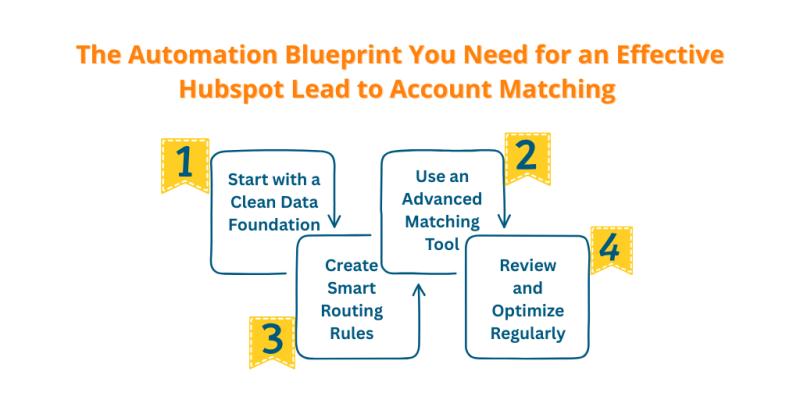
So what does an effective HubSpot lead to account matching automation blueprint actually look like?
Here’s a step-by-step breakdown:
1. Start with a Clean Data Foundation
Standardize company names, domains and email formats
Normalize field values (e.g., USA vs. United States)
Implement validation at form-fill or import stages
2. Use an Advanced Matching Tool
Leverage a HubSpot CRM lead-to-account matching tool like LeadAngel that allows:
Multi-field matching
Fuzzy logic
Custom rules
Hierarchical account mapping
3. Create Smart Routing Rules
Match based on ideal customer profile (ICP)
Route based on account ownership, region or product interest
Automatically assign or notify reps via workflows
4. Review and Optimize Regularly
Monitor match rate reports
Identify unassigned or mismatched leads
Adjust logic based on business changes
With this system in place, you’re not just improving lead flow, you’re enabling a smarter go-to-market engine.
Why LeadAngel for HubSpot Integration?
LeadAngel offers seamless lead-to-account matching HubSpot integration, empowering you to build powerful, no-nonsense workflows. It works directly with your CRM data and integrates advanced logic into your existing ecosystem.
Whether you’re looking for advanced domain matching, real-time assignment or scalable lead management, LeadAngel provides a tailored solution. It’s built for modern B2B teams who can’t afford mismatches or lead delays.
With LeadAngel, L2A matching in HubSpot becomes a frictionless part of your sales workflow, not a bottleneck.
Final Thoughts
Don’t let bad matches kill your deals. Poorly executed lead-to-account matching leads to inefficiencies, missed opportunities and frustrated teams. The good news? You don’t need to overhaul your entire CRM setup — just implement the right automation approach.
By avoiding the common pitfalls and using an optimized blueprint, you’ll see better match accuracy, faster lead routing and more effective sales conversations. And with tools like LeadAngel driving your HubSpot lead to account matching automation, you’ll be future-proofing your sales process.
