How To Recover Deleted WeChat Chat History From iPhone

WeChat is a famous messaging app users by
many iOS or Android users. Wechat app stores chat history with your friends,
family members, colleagues and other people. There are many users who have lost
or deleted Wechat chat history from their iPhone and they want to get them
back.
If you are
also one of them then this guide will surely help you. Here, we have introduces
different solutions on how to recover deleted WeChat chat history from iPhone.
Solution 1: Recover Deleted WeChat
Chat History From iPhone
If you have
previously created backup of WeChat message history on WeChat app then you can
easily restore them back to your iPhone.
Follow the
below steps to restore WeChat chat history from iPhone through WeChat app.
Step 1: On your iPhone open WeChat app and tap on Me button.
Step 2: After that tap on Settings > Chat > Chat history.
Step 3: Next hit on Restore Chat History.
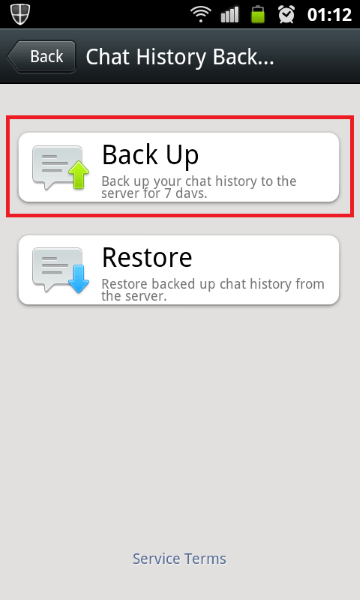
Step 4: Then tap backup file and restore.
Solution 2: Restore WeChat History From
iPhone Via iCloud Backup
If you have
backed up your iPhone to iCloud then restoring deleted WeChat data like images,
videos and messages from iCloud backup is very easy.
Here, follow
the steps to restore deleted WeChat chat history from iPhone via iCloud backup.
Using Computer
Step 1: Open iCloud website on your computer and login with same Apple ID and
password.
Step 2: Then tap on Settings.
Step 3: After that you will find various
files along with WeChat chat history. Here, you need to select the data that
you want to restore.
Step 4: Then click on “Restore files” and wait unless the restoring process gets
completed.
Using Your iPhone
Step 1: On your iPhone go to Settings > General > Reset > Erase
All Contents and Settings > Erase Now.
Step 2: Then you need to set up your iPhone
from starting. Then under Apps and Data
screen hit on “Restore from iCloud
backup”.
Step 3: Then enter the Apple ID and password
to login iCloud account.
Step 4: Then find the relevant backup file
(look its data and size) from available backup list.

Step 5: Now, the restoration process will be
started.
When the
process gets finished then you can access deleted WeChat chat history on your
iPhone.
Solution 3: Restore WeChat Chat
History From iPhone Using iTunes Backup
Like iCloud
backup, if you have also created backup of your iPhone to iTunes then you can
easily recover a deleted WeChat message conversation on iPhone.
Here, follow
the steps to restore WeChat history from iPhone using iTunes backup.
Step 1: Launch latest version of iTunes on
your computer and connect it to your iPhone using USB cable.
Step 2: Then click on your iPhone icon.
Step 3: Click on “Restore Backup” from Summary
tab.

Step 4: Then choose the desired backup file
by looking its data and size and the restoration process will be started.
Note: Both solutions 2 and 3 will erase the existing data from your
iPhone and it restore the whole backup file including WeChat chat history.
Bottom Line
Post Your Ad Here
Comments