Android Chat Head Library
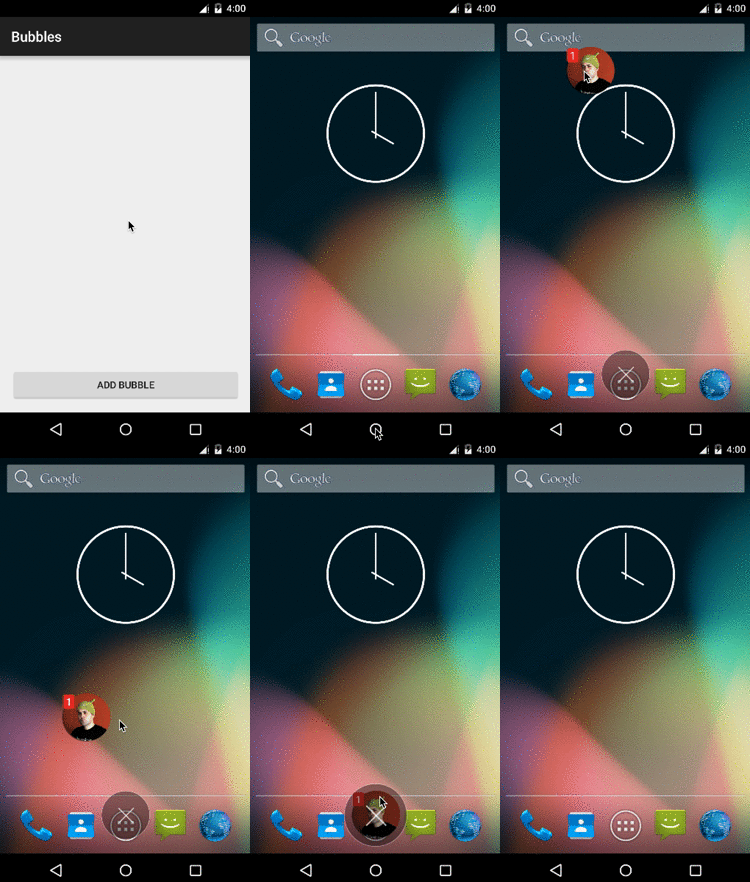
Chat head is new feature which floats on screen instead of residing inside conventional application. This feature is very continent for multitasking as user can work and chat at the same time.
Like you are using calculator and someone message you on Facebook then this chat is shown over calculator like a floating bubble and you can reply to this chat by just by clicking the chat head and then resume your work after ward .

So no app switching !!!
Here i introduced Chat Head Android Library called Bubble for Android.
How to use
Configuring your project dependencies
Add the library dependency in your build.gradle file.
dependencies {
    ...
    compile 'com.txusballesteros:bubbles:1.2.1'
}
Adding your first Bubble
Compose your Bubble layout, for example using a Xml layout file. Remember that the first view of your Bubble layout has to be a BubbleLayout view.
<com.txusballesteros.bubbles.BubbleLayout
    xmlns:android="http://schemas.android.com/apk/res/android"
    android:layout_width="wrap_content"
    android:layout_height="wrap_content">

    <ImageView
        android:id="@+id/avatar"
        android:layout_width="70dp"
        android:layout_height="70dp"
        android:layout_gravity="center"
        android:background="@drawable/profile_decorator"
        android:src="@drawable/profile"
        android:scaleType="centerCrop"/>

</com.txusballesteros.bubbles.BubbleLayout>
Create your BubblesManager instance.
private BubblesManager bubblesManager;

@Override
protected void onCreate(Bundle savedInstanceState) {
     bubblesManager = new BubblesManager.Builder(this)
                                        .build();
     bubblesManager.initialize();
    ...
}

@Override
protected void onDestroy() {
    bubblesManager.recycle();
    ...
}
All Categories
Womens Interests
110
Finance
423
Self Improvement
192
Others
673
Book Reviews
42
Languages
28
Real Estate
470
Music
35
Marketing
3279
Affiliate Marketing
1551
Relationships
146
Software
297
Career
167
Communications
153
Legal
149
Environment
49
Home & Family
880
Spirituality
54