How to download video from Facebook through web directly on PC without any software
- Facebook is a part of our life now, we use it to chat with our family and friends, post our experiences or thoughts on the timeline, we also can join the group to communicate with those who have the same interests. When you see some interesting videos on Facebook, you must feel an eager to download it.
- In fact, there are some software on web that can make you to download videos from Facebook, such as Gihosoft TubeGet, but that’s not what I want do say today. Why install any software and fill extra GBs when all these things can be done directly through the web? In this article, I will tell you how to download Facebook videos through web directly without any software.
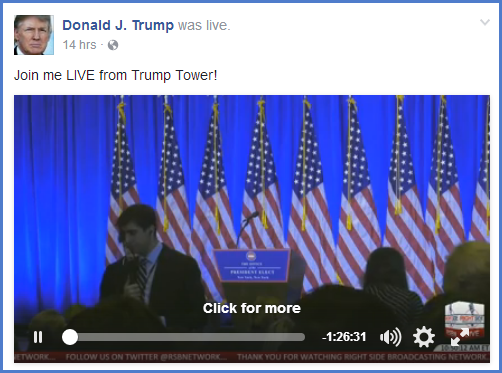
- 1. Play the video you want to download on your Facebook.
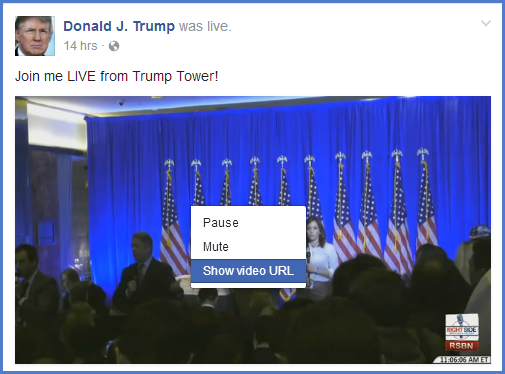
- 2. Right click the mouse on the video, select Show video URL.
- 3. Copy the URL.

- Tips: If you have a video downloader, like Gihosoft TubeGet, you can
- paste the URL in the software to download the video.
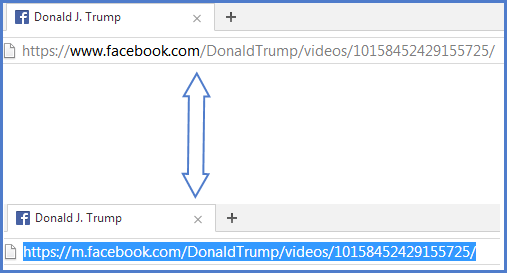
- 4. Paste the URL to the address bar and replace the "www" with "m", then press
- the Enter button.
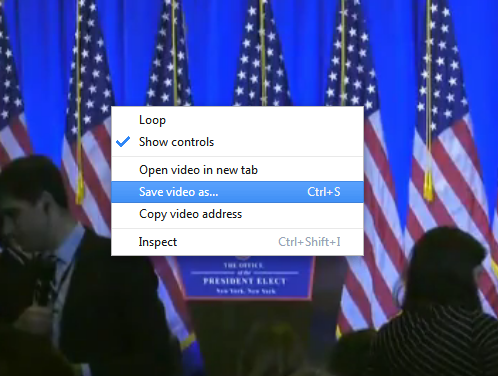
- 5. A new interface will pop up, play the video again, right click the mouse again and select Save video As.
- 6. Choose the destination you want to save your video, and name the video, then press the Download button.
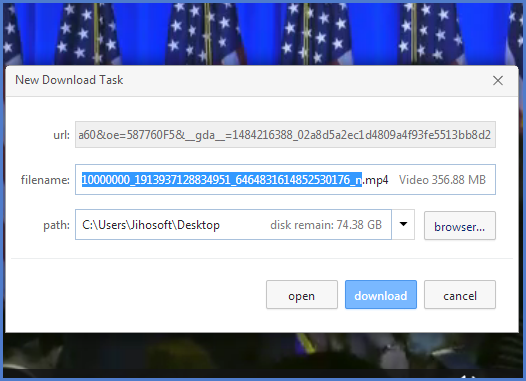
- These are steps to download videos from Facebook, if you want to download video from YouTube, you can refer to this article: 5 Best Free YouTube Video Downloaders to Download Videos from YouTube.
All Categories
Environment
49
Affiliate Marketing
1551
Travel
850
Self Improvement
192
Food & Drink
451
Finance
423
Communications
153
Computers
352
Health & Medical
2882
Technology
635
Business
4847
Kids & Teens
20
Arts & Crafts
361
Languages
28
Software
297
Real Estate
470
Education
431