Top 5 AVI to MP4 Converter for Mac (El Capitan included)
#1. MacX Video Converter Pro (El Capitan included)
MacX Video Converter Pro features an intuitive interface, making it easy to operate for users at any level. According to 9to5Mac, it's the world's unique AVI to MP4 converter for Mac that is armed with hardware acceleration technology, enabling QSV to speed up AVI to MP4 conversion up to 5x faster, rather than at the expense of CPU occupation. On top of that, it won't sacrifice any image quality, thanks to the high-quality engine and deinterlacing tech. If you use a PC, you can get the Windows version to convert AVI to MP4 as well.
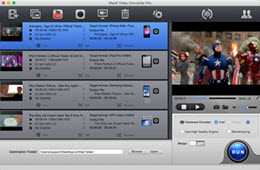
- Convert virtually any format, incl. AVI, MP4, WMV, MKV, MOV, MTS, etc, with 370+ video/audio codecs equipped.
- Convert AVI or others to iPhone, iPad, Samsung, HTC, PS4, Windows Phones, etc.
- Download online videos from YouTube, Vimeo, Dailymotion, Fadebook and more.
- Compress AVI to smaller size via trimming/cropping, adjust parameters and add subtitles to AVI.
- Record on-screen activities in AVI, MP4 or so and make photo slideshows with music.
#2. Miro Video Converter
Miro Video Converter is well known for its stripped-down interface that allows even the beginners to convert AVI video for Mac's MP4-playable QuickTime with a minimal fuss. Despite the AVI to MP4 converter for Mac has only a few output profiles compared with other tools, the wide range of format support, like .avi, .mp4, .flv, .mkv and more, ekes out, making it really a great tool to fast convert video files.
Pros: Easy operation.
Cons: Relatively outdated device profiles.
#3. Movavi Video Converter
The wide array of customization tools makes Movavi Video Converter a solid choice for AVI to MP4 converter for Mac, in particular if you need to do more edition. Specifically, you can split AVI or merge multiple AVI files into one video in MP4, crop it to smaller size and even add watermark to make the vide unique, while converting AVI to MP4. Besides, it even optimizes AVI conversions for specific devices (iPhone, iPad, Sony PSP, Blackberry and many more).
Pros: This AVI converter for Mac produces high-quality MP4 video.
Cons:
* Some buttons appear to have a confusing icon.
* It takes a massive amount of system resources.
#4. Aiseesoft Video Converter
Aiseesoft Video Converter tops our list in our review of the best AVI to MP4 converter for Mac. The output quality leaves little to be desired as it converts AVI and other videos to HD format, including WMV HD, HD TS, HD MTS, and so on. If you are always concerned about on-the-move playback, Aiseesoft is a must-have regarding to a versatile video converter for Mac. The output video files are highly compatible with even the most popular iPhone 6S/SE, iPad Air, Galaxy S7.
Pros: Output high-quality video files.
Cons: Lacks some essential features like DVD burning and subtitle adding.
#5. Handbrake
Needless to say, the very basic video converting feature, the easiness and the open source draw your attention to Handbrake from other Mac AVI to MP4 converters, even though it only outputs videos in MP4 and MKV. But if you only need to convert AVI to MP4 for your Mac, why not taking a shot. Plus, the extra DVD ripping feature bundled in Handbrake spares yourself the trouble in finding an additional tool to rip DVD as well.
Pros: Adjust the video quality to suit required file size.
Cons: It sometimes crashes and won't work well on El Capitan.
Tip 1: How to Play AVI on Mac OS X?
AVI is famous for Windows compatible format and is isolated from Mac platform. Installing a QuickTime plugin called Perian can somehow solve the AVI won't play on Mac problem. But considering its inactive development, resorting to some video players for Mac like VLC or 5KPlayer can be a good option. Or else, the above mentioned AVI to MP4 converter Mac users can rely on is must-have.
Tip 2: What Are Differences between AVI and MP4
AVI and MP4 are both the most popular and widely compatible video formats. AVI occupies much hard drive space due to the minimal compression features to reserve good quality, while MP4 is smaller in size and compresses with video codec Xvid, MPEG4, H.264 MP3, AAC, so if you are looking to stream or store videos on your mobiles, MP4 is your better bet. See more AVI vs. MP4 details.
Post Your Ad Here
Comments