Step by step Mercedes c4 MB SD Connect C4 WLAN Setting Guide
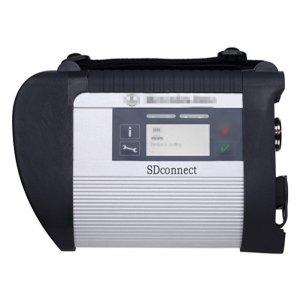
MB SD Connect Compact 4 is a newest and powerful daimler Chrysler multiplexer with high quality. MB SD Connect C4 can connect PC by Lan cable and by Wireless. Now here autodiagnosticobd sharing step by step Mercedes star diagnosis mercedes c4 mb sd connect 4 WLAN Setting Guide.

Steps of MB SD Connect C4 WLAN Setting Guide
1. Find out and open Local Area Connection Properties>>General>>Internet Protocol (TCP/IP) Properties. Set IP address as 172.29.127.XXX (any digit combination between 1 to254) and subnet mask as 255.255.0.0.

2. Double click MB SD connect C4 to open the control menu.


3. Select "Configuration" icon and accept the warning message by click "Yes"

4. Select "Register/Configure" under the "MUX" icon

5. Select the desired SD connect name

6. Set WLAN parameters, Road including: ID address, Network screen, SSID (network name), Encryption, key/
ID address: 192.168.2.200
Network screen: 255.255.255.0
SSID (network name): Road24h
Encryption: WEP/Hex
Network key: aaaaaaaaaaaaaaaaaaaaaaaaaa (26 * a)

7. Click "Start" to continue network configuration

8. WLAN configuration information will display on the next program.

9. Open SD connect wireless connection Internet Protocol (TCP/IP) Properties. Set the IP address as: 192.168.2.xxx (any digit combination between 1 to254 except 200) and set subnet mask as 255.255.255.0.

10. Reflash wireless network list and select "Road24h"

11. Enter and confirm the network key: aaaaaaaa*a (26*a)

12. The windows display the network connection is completed.

13. Come back to the SD C4 Control menu. Select "Select MUK" to check WLAN accessible

14. Select "Configuration" in the main menu and click "Self-diagnosis"

15. SD connect Toolkit window display SD C4 starts to process self-diagnosis

16) The self-diagnosis result will be shown on the window program.

3 people like it


Advertise on APSense
This advertising space is available.
Post Your Ad Here
Post Your Ad Here
Comments