Modbus, the best way to communicate with your touch screen devices
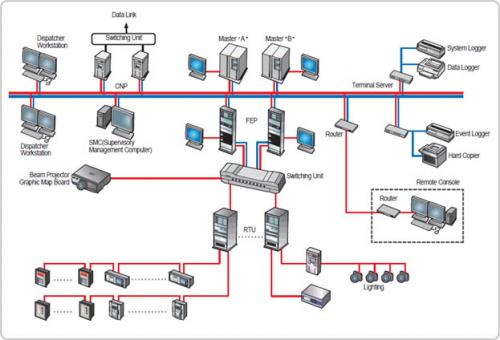
No one wants their privacy to be compromised and in this advanced technology, Modbus has been paving the way for communication between several devices, be it touch screen, PLCs and gateways in order to complement industrial buses of other types. You will need it for-
• Communication of client and server
• Communication with touch screens
• Differentiating between registered device type and read write access type etc.
How does it work?
The most important question is how does it function? Well to explain this, we need to refer to master cum slave technology that is used to incorporate all the features that is promised by this application. One master is connected to each of the many slave devices. They cannot interact with one another in any circumstances. They cannot act unless a command has been passed by the master device. It can easily identify the users and distinguish between commands given. PC touch screen is one of the devices which can work pretty well when Modbus is installed. Modbus protocol if installed for touch screen PCs, can work wonders by giving the liberty of viewing and inputting data without using any input device like keyboard or mouse. Modbus enhances many features in a touch screen.
Hardware and Software requirement
In order to install this application, there are certain hardware and software requirements that are mandate. You must have a host PC and NI CVS -145 x device. Vision builder Al Version 2.5 or later is another pre requisite. NI-VISA 3.0.1 needs to be installed on the host PC. You can visit ni.com/visa in order to download the NI-VISA driver software. This software facilitates the communication between the PC server and the Modbus. As every installation is complete only with the minimum software and hardware conditions fulfilled, the same is applicable in this process too.
How to connect a slave device to the master device?
First of all the master device that is the PC touch screen has to configure the serial port settings. After that, use the device manager, Modbus in order to set up and start the server. If you face any issue you may also follow the guidelines in the documentation of the device for configuring PC touch screen. The steps need to be adhered to as per the instructions for either a PC or a CVS -145x system. It is advisable to follow the steps to the T so that nothing is missed. You shouldn’t go wrong in doing this job done perfectly as it may result in complications.
How to set up the Com port?
Setting up the Com port is not too easy. First of all, you need to launch MAX. After that, expand the devices and interfaces. Then expand the ports. Make selection of the com port which is connected to the master device. You will see the port setting tab right at the bottom of the MAX window. You need to click on that. Now do the configuration settings corresponding to the master device’s serial setting. You are almost done. Finally you need to click on the save button. That’s all. You have completed the process of configuration of Modbus with the master device. Did you think that the steps could have sounded so easy compared to your imagination. Due to its user friendliness and known as one of the most versatile gadgets has been in demand off late.
Hey myself Archer Finch. Even though I took extra care about my systems, but still it was more prone to hacking. With the introduction of the PC Touch Screen, my system is now very much safe from all sorts of threats, as most of the Modbus are connected to web based portals or products.
• Communication of client and server
• Communication with touch screens
• Differentiating between registered device type and read write access type etc.
How does it work?
The most important question is how does it function? Well to explain this, we need to refer to master cum slave technology that is used to incorporate all the features that is promised by this application. One master is connected to each of the many slave devices. They cannot interact with one another in any circumstances. They cannot act unless a command has been passed by the master device. It can easily identify the users and distinguish between commands given. PC touch screen is one of the devices which can work pretty well when Modbus is installed. Modbus protocol if installed for touch screen PCs, can work wonders by giving the liberty of viewing and inputting data without using any input device like keyboard or mouse. Modbus enhances many features in a touch screen.
Hardware and Software requirement
In order to install this application, there are certain hardware and software requirements that are mandate. You must have a host PC and NI CVS -145 x device. Vision builder Al Version 2.5 or later is another pre requisite. NI-VISA 3.0.1 needs to be installed on the host PC. You can visit ni.com/visa in order to download the NI-VISA driver software. This software facilitates the communication between the PC server and the Modbus. As every installation is complete only with the minimum software and hardware conditions fulfilled, the same is applicable in this process too.
How to connect a slave device to the master device?
First of all the master device that is the PC touch screen has to configure the serial port settings. After that, use the device manager, Modbus in order to set up and start the server. If you face any issue you may also follow the guidelines in the documentation of the device for configuring PC touch screen. The steps need to be adhered to as per the instructions for either a PC or a CVS -145x system. It is advisable to follow the steps to the T so that nothing is missed. You shouldn’t go wrong in doing this job done perfectly as it may result in complications.
How to set up the Com port?
Setting up the Com port is not too easy. First of all, you need to launch MAX. After that, expand the devices and interfaces. Then expand the ports. Make selection of the com port which is connected to the master device. You will see the port setting tab right at the bottom of the MAX window. You need to click on that. Now do the configuration settings corresponding to the master device’s serial setting. You are almost done. Finally you need to click on the save button. That’s all. You have completed the process of configuration of Modbus with the master device. Did you think that the steps could have sounded so easy compared to your imagination. Due to its user friendliness and known as one of the most versatile gadgets has been in demand off late.
Hey myself Archer Finch. Even though I took extra care about my systems, but still it was more prone to hacking. With the introduction of the PC Touch Screen, my system is now very much safe from all sorts of threats, as most of the Modbus are connected to web based portals or products.
Advertise on APSense
This advertising space is available.
Post Your Ad Here
Post Your Ad Here
Comments