How to setup Renault CAN Clip!!
 How to setup Renault CAN Clip
from www.obd2cartool.com
Super Renault CAN Clip is obd2cartool Top Quality Can Clip Diagnostic Interface for Renault. Super Can Clip with AN2135SC chip is original factory design can clip with full chip. Top Qualtiy Can chip 2135SC chip Support ECU programming.
Super CAN Clip Diagnostic Interface with AN2135SC chip for Renault Can Clip
Why you choose super can clip?
1. Super CAN Clip Vehicle Communication interface is orginal factory design full chip can clip.
2. Top Quality Can Clip with full chip mostly important is with AN2135SC chip.
3. Super CAN Clip is the Dealer Level Automotive Diagnostic Scan Tool for Renault car.
4. Renault Can Clip is designed to diagnose Renault car models including automatically test all Renault models' computers, reprogramming, airbag test and other functions.
Description
Renault CAN Clip setup instruction,Renault Clip setup manual,Renault supported language and compatible car market
Check the attachment about " Renault CAN Clip setup instruction,Renault Clip setup manual,Renault supported language and compatible car market".
more information please link to :http://www.obd2cartool.com/super-can-clip-for-renault-diagnostic-interface-golden-can-clip-with-an2135sc-chip-p-398
Renault Can clip setup three main steps:
First step: set your PC language as English.
Second step: install "Crack".
Third step: install “setup.exe”, at this step, you can select the language you want.
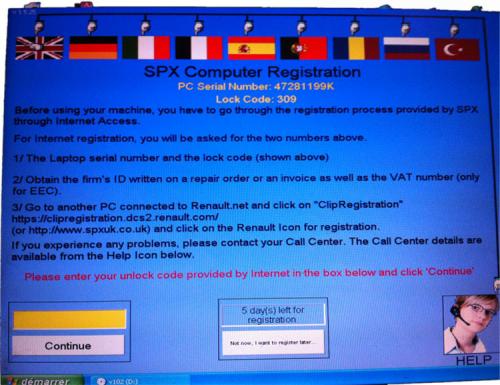
Renault can clip 5 days left for registration:
During usage Renault Can clip, when this icon appears,it reminds you 5 days left for registration, you have three options to solve this problem:
Option one : change your computer system time. Because this system works in the following 5 days once you register SPX computer, please change the computer system time at any day earlier than the day you register SPX computer. For example, it is 24th today and you do SPX computer registration, then when this window appears, please set the computer time as 25th. When you come to 28th, please change the system time to 29th, or 30th.
Today it is 24th as follows:
2
Change as 25th as follows:
3
Option two:
press ctrl+alt+delete, then go to Windows Task Manager
4
Select "Process" to find RSRwin.exe, then "End Process"
5
Notes:
1. Be sure to disable/uninstall anti-virus software
Please note,anti-virus software can flag up Renault CAN Clip software as having a virus. This is a false positive and is due to the software containing the application file. So Before setup the device software, please disable/uninstall anti-virus software or install a more reliable free virus scanner! Our Renault CAN Clip software is completely safe and virus free and all other virus scanners confirm this.
If the software data is destroyed or lost because you forget to disable/uninstall anti-virus software, please contact our customer service, we arrange to resend you CD or send you the software via internet.
2. Required windows operation system is windows XP
Be sure to setup and run the device software under windows XP. Otherwise the device software and program can be broken or it will fail to work.
Any qustion also can email to us help you to slove.
How to setup Renault CAN Clip
from www.obd2cartool.com
Super Renault CAN Clip is obd2cartool Top Quality Can Clip Diagnostic Interface for Renault. Super Can Clip with AN2135SC chip is original factory design can clip with full chip. Top Qualtiy Can chip 2135SC chip Support ECU programming.
Super CAN Clip Diagnostic Interface with AN2135SC chip for Renault Can Clip
Why you choose super can clip?
1. Super CAN Clip Vehicle Communication interface is orginal factory design full chip can clip.
2. Top Quality Can Clip with full chip mostly important is with AN2135SC chip.
3. Super CAN Clip is the Dealer Level Automotive Diagnostic Scan Tool for Renault car.
4. Renault Can Clip is designed to diagnose Renault car models including automatically test all Renault models' computers, reprogramming, airbag test and other functions.
Description
Renault CAN Clip setup instruction,Renault Clip setup manual,Renault supported language and compatible car market
Check the attachment about " Renault CAN Clip setup instruction,Renault Clip setup manual,Renault supported language and compatible car market".
more information please link to :http://www.obd2cartool.com/super-can-clip-for-renault-diagnostic-interface-golden-can-clip-with-an2135sc-chip-p-398
Renault Can clip setup three main steps:
First step: set your PC language as English.
Second step: install "Crack".
Third step: install “setup.exe”, at this step, you can select the language you want.
Renault can clip 5 days left for registration:
During usage Renault Can clip, when this icon appears,it reminds you 5 days left for registration, you have three options to solve this problem:
Option one : change your computer system time. Because this system works in the following 5 days once you register SPX computer, please change the computer system time at any day earlier than the day you register SPX computer. For example, it is 24th today and you do SPX computer registration, then when this window appears, please set the computer time as 25th. When you come to 28th, please change the system time to 29th, or 30th.
Today it is 24th as follows:
2
Change as 25th as follows:
3
Option two:
press ctrl+alt+delete, then go to Windows Task Manager
4
Select "Process" to find RSRwin.exe, then "End Process"
5
Notes:
1. Be sure to disable/uninstall anti-virus software
Please note,anti-virus software can flag up Renault CAN Clip software as having a virus. This is a false positive and is due to the software containing the application file. So Before setup the device software, please disable/uninstall anti-virus software or install a more reliable free virus scanner! Our Renault CAN Clip software is completely safe and virus free and all other virus scanners confirm this.
If the software data is destroyed or lost because you forget to disable/uninstall anti-virus software, please contact our customer service, we arrange to resend you CD or send you the software via internet.
2. Required windows operation system is windows XP
Be sure to setup and run the device software under windows XP. Otherwise the device software and program can be broken or it will fail to work.
Any qustion also can email to us help you to slove.
Advertise on APSense
This advertising space is available.
Post Your Ad Here
Post Your Ad Here
Comments