How to remove Social2Search from PC and browsers
What is
Social2Search, and how it differs from other adware
Adware
development is a very promising sector for hackers and other Internet scams. In
recent years, the number of PC users is growing rapidly and so many people are
working directly on the Internet, looking through hundreds of pages every day
and visiting hundreds of websites. And if earlier from viruses and adware
suffered mostly inexperienced users, but now they were joined by people that
are working on the Internet. You have to agree, it’s pretty easy to miss the
download of a file or accidentally click on a confirmation, if you are flipping
websites uninteresting to you or answer the recurring questions all day. Every
day the world becomes more and more PC users, and adware is becoming more
efficient and more profitable. It infects computers, and starts to show ads in
browsers until you delete it. But not every user is able to do it, and
sometimes it takes several days or even weeks before the program is finally
removed from the computer. During this time, the owner of the infected computer
manages go to malicious links few dozens of times, which helps fraudsters to
create traffic to third-grade websites, and bring them to the top of issuance. At
the same time, adware manages to greatly clog the computer, and let a lot of
other viruses to enter the system.
Those who
are often faced with clogged computers, or those who have already been victims
of viruses or adware, probably know such names as DNS Unlocker, Wajam, Albireo
or Provider. These adware samples were the most intrusive, active and difficult
to remove until recent time. Few months ago, the new program called
Social2Search had appeared in the Web. It quickly settled on this,
"market", and is now ahead of all other competitors by all odds.
This
program is so dangerous not because of its features, but because of its well-written
description and user-friendly interface. These two factors work to lull the
user’s vigilance, and convince him that Social2Search it a good program.
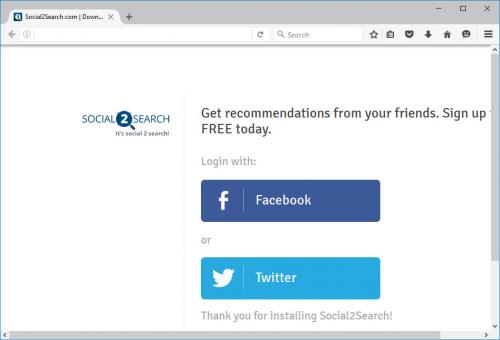
According to the description, Social2Search is a special tool that interacts
with such well-known social networking sites like Facebook and Twitter. The
purpose of this interaction is to obtain information about the visits of your
friends to various websites, and their “likes”, and show you this information.
Those who install the program are not concerned that such actions aren’t
suitable for everyone. In addition, the developers claim that Social2Search may
adversely affect your computer, resisting the actions of other programs
(obviously, anti-viruses), and that it is very difficult to remove.
Despite
this, users are in a hurry to set Social2Search and to use its non-existent
functions. For reference, any social network in the first place shows likes of
your friends, and only then - all the rest. So, Social2Search deceit entices
the user to install, does not perform the claimed function, prevents the user
to use the Internet, and displays tons of ads on each page, and each new tab.
The only way to stop this outrage is to remove Social2Search from your
computer.
How to
remove Social2Search
As I said
earlier, Social2Search isn’t very tricky as a program. You can use the standard
removal techniques to get rid of it. But, if the program had functioned on your
PC for more than a day – you may face some difficulties. Anyway, there’s two
ways to uninstall Social2Search: you can do it manually, or with help of AV
software. Both ways are completely safe, and were tested many times with
thousands of users, but there is one major difference: manual removal is
one-off, and the protection of antivirus will last for a long time. So, it’s up
to your decision. If you want to protect your PC from all kinds of adware and
viruses for years – you should purchase the reputable anti-viral tool. We
advise you to use Spyhunter, because it’s one of the most effective and
low-price tools. It also has other impressive features, like 24/7 tech-support,
wide and daily updated database, plain and friendly interface, low CPU usage.
But, if you just want to remove this virus quickly and forget about all
viruses and removal programs – just follow the instructions in the main article about how to remove Social2Search.
Post Your Ad Here
Comments