How to Manage Counterfeit Memory Cards
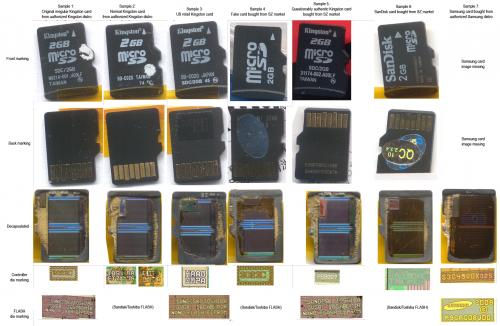 Counterfeit memory cards actually are not a new problem in gadget industry these days. You can easily find sellers who sell this kind of products. Which make a lot of gadget consumers fooled by this product is mainly due to its cheap price. If you get one while buying, you should directly accuse yourself for doing so since many of them are created physically identical with the genuine ones. Even though it is physically similar, but you will discover different quality between them. There are numerous signs which can be used to indicate your memory card is considered as counterfeit. It commonly shows worse quality such as loss of data, sluggish data transfer, or different performance which is far from what is claimed. The counterfeit one may show one or combination of those bad qualities. However, these are simplest tips that can help you to manage this problem if you get non-genuine card.
 Determine the real size
In order to identify that your card is not original can be done by knowing its real size. Even though it seems trivial but it will truly help you in this process. There numerous programs which can be free and open sources that will ease your work in determining the size of the card. H2testw happens to be one which is simplest and widely used by a lot of people to define whether a memory card is genuine or not. This program is available on its official site and can be downloaded easily. You can start running the program by selecting small size in Data Volume box. Then, select Write + Verify. It will write unsystematic data in order to test the size of the card. How it takes often defends by the type of card. Pay attention on the data transfer speed during the process. Once the process is finished, it will reveal the real card’s size according to the analysis.
Change the card into original size
After you have known the real size of the counterfeit memory card, then, you often with change it into its original size. There are a number of programs which you can use to format the card’s size. MiniTool Partition Wizard is the most popular program used to do this duty since it is very simple and reliable. Besides, it is available in free version so that all people can take benefit of it. First, you need to download the free version of this program. Then plug in the memory card. You had better to use USB drives for safer process. After you have connected the card with the computer, choose it using MiniTool program. After emphasizing the card, choose Delete Partition and continue the process by clicking Create New Partition. Write the real size of the card based on the reported information you get from H2testw program. After you input the original capacity, then finish with Apply button.
Recheck the formatted card size
After you end to process of resizing the fake card, you need to identify the size once more. All you have to do is by checking the formatted card using the H2tetsw program likes the previous one you have done. By repeating the process will help you discover whether the formatted version have matched with its real size or not. This simple technique most likely works on fake model.
However, avoiding it is better than treating. Hence, whenever you want to get a memory card you had better to consider it previously. For instance, you should note being tricked by cheap price. Instead, choose the one with good quality. If you buy it through online vendors, make sure to get it from trustworthy vendors.
Meta: Getting counterfeit memory card can be truly annoying so that knowing the steps to format it into its original size can be really helpful.
Distributed by: THEALMOSTDONE.com
Advertise on APSense
This advertising space is available.
Post Your Ad Here
Post Your Ad Here
Comments