Convert MS Outlook to Mac Mail with PST Extractor Pro
Email migration has gained a lot of popularity in recent times. Due to the exploding demands in features of desktop email clients, there has also been an increase in the supply of email clients, and their functionality has been on a sharp curve. That helped in the popularity of email migration and users aren't now confined to just one email client. They can switch anytime they wish.
Shifting from Windows to MacBook is yet another widely observed transition nowadays. MacBook has shown its advantages in certain situations over Windows. But, the main problem is when a user has to switch between email clients, too. Windows Outlook and Applemail are two very different email clients, with different source code and different email storage file formats.
This article will discuss the migration of MS Outlook to Mac Mail, and how you can use the Pst file and the tool “Pst Extractor Pro” to actually move your data from one OS and Email client to other.
Outlook PST FILE
PST file is a Windows outlook database file. PST (Personal storage table) is a file format where Windows Outlook stores all of its data, such as emails, contacts, tasks and calendar items. PST format provides certain number advantages over any other file format, such as, PST can be password protected. However, Microsoft accepts that PST password is not a strong security measure.
PST is supported by several of the Microsoft client applications and software, including Microsoft Exchange client, Windows messaging, and of course, windows Outlook. PST is an open source format for which Microsoft provides free specifications and free patent licensing.
Mac Mail as the most Popular Email client on Mac
Apple Mail is an email client for Apple Mac OS X. It already comes installed in Mac OS X and is thus free.
Like MS Outlook, Apple Mail offers tons of useful features and can make the management of emails and other information a lot more effective. It has been called a complete information manager, and not just an email client, because of its wide range of feature and type of items it support, such as – Email Messages, Calendar, Contacts, Reminders, etc.
Mbox (mailbox) file format
Lastly, we are going to read about the MBOX format, which is a format that Apple Mail uses as a storage for all of its contents.
Mbox is a generic term for a family of related file formats used for holding collections of electronic mail messages, first implemented for Sixth Edition Unix.
All messages in an mbox mailbox are concatenated and stored as plain text in a single file.
Here's how you can convert PST into Mbox
There aren't any shortage of file converters for Pst to Mbox. But most of them are incomplete with risk of data corruption running alongside them. The most recommend professional tool to achieve this task is “Pst Extractor pro”..
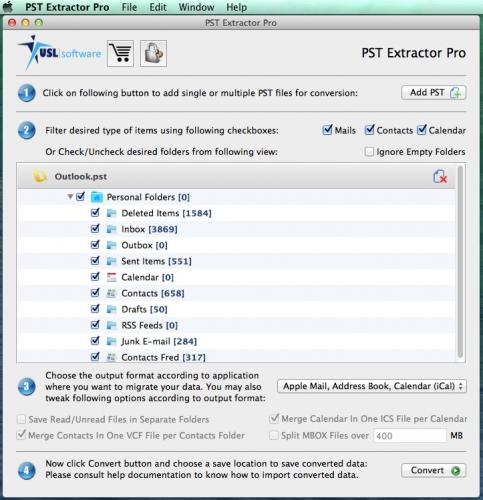
Download the trial version here and install it. The installation is extremely quick and requires no technical knowledge. Once installed, all you have to do is simply load the Pst files from MS Outlook and choose “Mbox” as the output format. It will extract every item from Pst and implement it to Mbox. And then, you can import it into your Mac Mail client. Nice and easy.
Once you have seen that it can do what it says, you can register for the full license and start converting unlimited items from Pst. Download it now at http://www.pstextractorpro.com/

Comments