Fascinating Evolving Features of Opencart Multivendor Extension
Today in our article we will discuss three of the very advanced and fascinating features of Opencart Multivendor Extension, In this article we will not discuss about basic features of the multivendor you can go through other articles for that we kept publishing,
Although there are lots of more and more fascinating and evolving features in multivendor extensions,
We will discuss just three of the new evolved advanced features so as to keep the article interesting,
Seller Custom Field
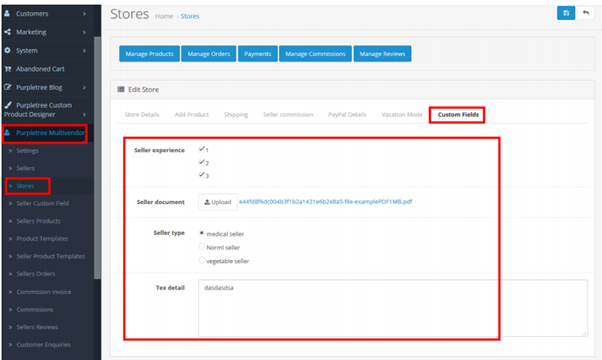
Seller custom field is one of the quite curious feature, it gives admin unique power and benefit for the seller also, as admin can create any seller custom field of any type weather file, radio, form field, based on the need weather it just fill your business registration number, fill seller license number, made the selection from options (radio buttons) not only this seller can also upload documents,
If seller template field created is file.
Admin can also Edit and Delete Seller Custom Fields. Admin can see all seller custom fields on the seller store edit page.
It is so easy and result oriented that you just enter seller custom field name, locations (where this field appears in the seller registration form), Type - really superb you can select radio options also, file for uploading, sort order.
Email Templates
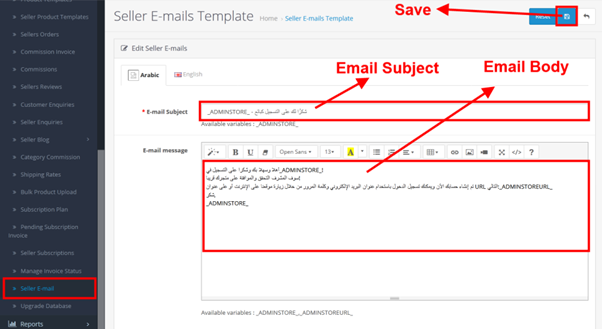
This is really an awesome feature that allows Opencart Multivendor’s admin ability to customize email templates format already available in admin and any that particular Opencart Multivendor supported languages. In the email templates, there are many default templates
In the listing of email templates, admin can see on which case mail will send that will to the seller, customer, and admin.are created for admin, seller,
Admin can also customize the email templates
Admin can change the whole template text other than the variables which start with an underscore (_), in their own language! So as admin can handle it very smoothly and maintains its flow.
Seller vacation mode
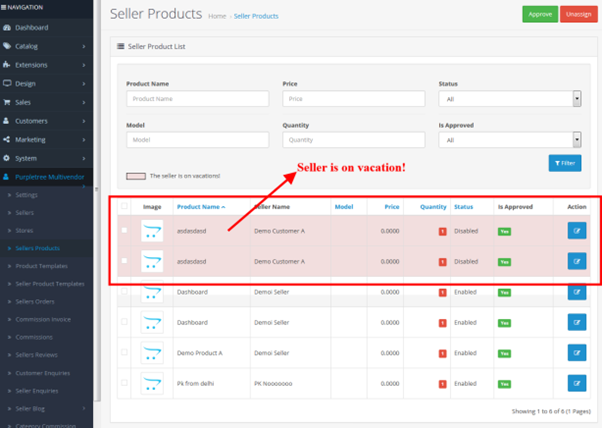
This is also a very fascination point, the seller or admin can enable the vacation mode by which seller products, seller template products, etc. will not appear on the website.
It is also very easy to enable seller vacation from admin,
All the products are disabled of the seller whose vacation mode is enabled. Vacation products are shown by different background, in products list,
On seller side to enabled or disable the seller vacation mode from seller panel also,
Generally what happens after enabling the seller vacation mode?
- Seller profile is still visible, but not the products.
- Seller blog will not be visible.
- Seller is not visible in the seller featured module.
- Customer would not be able to contact with seller.
- Seller product shall be disabled when the seller turns on the vacation mode. But when the seller turns vacation mode off, all the products disabled due to vacation are again enabled.
- The products which were disabled before turning on the vacation mode, will remain disabled whatever you set for the vacation mode.
- Seller template products are not visible in the seller price module on the product detail page.
- Seller shall not be visible in-store featured module
- When the seller adds product from bulk product the product will be added but as disabled.
As per the latest information the one of the most popular sellers of Magento & Opencart Extensions, Purpletree software LLP has added these features very recently In their Purpletree Opencart Multivendor Marketplace Extension , now these features are fully functional in their multivendor marketplace extension .
Post Your Ad Here
Comments